Antigravity uses a unified authentication layer across Antigravity App, Antigravity CLI, Antigravity for IDEs, and the Antigravity SDK. Signing in on one local surface shares your credentials across your local environment.
按开发环境登录
Select your surface below to authenticate your account, switch credentials, or configure headless and enterprise environments.
个人 Google 账号
- Launch Antigravity App.
- Click Sign in to open the browser authentication flow.
- Complete the browser-based OAuth flow using your personal Google Account (Free, Pro, or Ultra plan).
- 完成身份验证后,浏览器会重定向回 Antigravity App。首次启动时 (
v2.30.0+),请选择最符合您工作性质的选项(或点击跳过以使用默认的软件工程配置),并确认条款与数据使用,以配置初始界面布局以及主页上的初始提示词(请参阅快速上手)。
Gemini Enterprise 与 Google Cloud 账号
Google Antigravity 针对企业账号采用单点登录 (SSO) 流程。您可以使用 Gemini Enterprise 许可证,或通过自己的 Google Cloud 项目按需付费:
- 启动 Antigravity App 并选择使用企业账号(适用 Google Cloud 服务条款)。如果您之前已登录过,请先选择其他登录选项。
- 选择 Continue with Google Cloud(如使用自带身份 / 员工身份联合,请选择 Use Advanced SSO Config 并输入贵组织的 WIF Configuration String)。
- 在浏览器中完成身份验证。
- In Select Billing Model, choose how you pay:
- Subscription(订阅):选择与您的项目关联的 Gemini Enterprise 许可证。如果未列出该许可证,请选择 Other License,通过输入您的 Google Cloud 项目 ID 并选择位置(
global、us或eu)来自行分配许可证。 - 按需付费 (Pay As You Go):输入你的 Google Cloud 项目 ID 并选择区域,无需 Gemini Enterprise 许可证即可按 token 付费(请参阅按需付费)。
- Subscription(订阅):选择与您的项目关联的 Gemini Enterprise 许可证。如果未列出该许可证,请选择 Other License,通过输入您的 Google Cloud 项目 ID 并选择位置(
应用默认凭据 (ADC)
For automated or headless workflows, you can authenticate Antigravity App using Google Cloud Application Default Credentials:
- Generate local Application Default Credentials for your project:
gcloud auth application-default login --project {GCP_PROJECT} - Enable ADC in Antigravity App using either option:
- Launch from a terminal with
export AGY_ADC_AUTH=true. - Or enable the
enableAdcuser setting in~/.gemini/config/config.json:{ "userSettings": { "enableAdc": true } }
- Launch from a terminal with
Antigravity CLI (agy) uses secure credentials and token profiles to communicate with the shared agent harness.
本地密钥环静默登录
When launching agy on your local machine, the CLI attempts to access your operating system’s native secure keyring (such as Apple Keychain, Linux Secret Service/dbus, or Windows Credential Manager). If a valid token profile is found, the CLI authenticates your session silently without opening a browser.
If no saved session is found:
- CLI 会自动启动您的本地默认 Web 浏览器。
- 使用经批准的账号凭据登录:个人 Google 账号请选择 Google OAuth;Gemini Enterprise 或按需付费计费请选择 Use a Google Cloud project → Continue with Google Cloud / Use advanced SSO config。如果您使用的是未配备 Gemini Enterprise 的 Google Workspace 账号,请参阅 Google Workspace 账号。
远程 SSH OAuth 认证流程
When running over SSH, the CLI detects the remote connection environment. Because it cannot launch a local web browser, the CLI initiates a manual URL loop:
- 在远程终端会话中启动
agy。 - CLI 检测 SSH 环境并打印唯一的安全授权 URL。
- 复制此 URL 并将其粘贴到本地计算机上的 Web 浏览器中。
- 使用您批准的凭据登录并完成身份验证。
- 浏览器显示唯一的字母数字授权码。
- 复制此代码,返回到远程 SSH 终端,并将其粘贴到提示符中。
使用 Gemini API 密钥
使用您自己的 Gemini API 密钥(而不是登录的 Google 帐户)运行 Antigravity CLI。模型请求直接进入 Gemini API,CLI 永远不会建立帐户会话。这适合无头和 CI 运行,其中没有浏览器可用于完成登录。在 Google AI Studio 中创建密钥。
To use a Gemini API key, you have to set a provider and an environment variable with the API key. Only setting a GEMINI_API_KEY environment variable on its own has no effect.
启用 Gemini API 密钥
-
将
modelProvider中的gemini设置为~/.gemini/antigravity-cli/settings.json:{ "modelProvider": "gemini" } -
将您的密钥导出为
GEMINI_API_KEY:export GEMINI_API_KEY="your-api-key"这仅适用于当前 shell。将同一行添加到您的 shell 配置文件中,例如
~/.zshrc或~/.bashrc,以在会话中保留它。 -
启动 CLI:
agy
CLI跳过登录屏幕,直接打开主界面。标题显示 Gemini API 密钥 而不是您的帐户电子邮件:
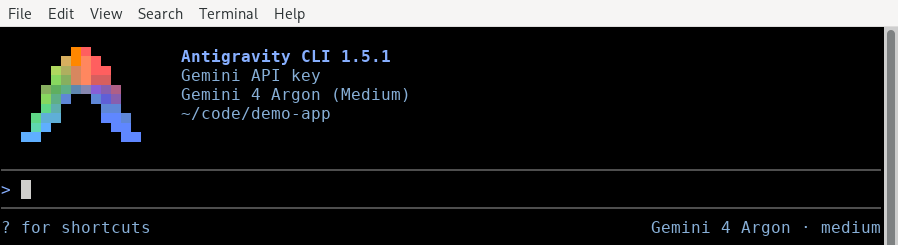
Note: When you use the authentication with a
GEMINI_API_KEY,/logouthas no effect because there is no stored session to clear.
将 CLI 指向自定义端点
要将模型请求发送到不同的 Gemini 兼容端点,请设置 GOOGLE_GEMINI_BASE_URL 环境变量:
export GOOGLE_GEMINI_BASE_URL="https://your-endpoint.example.com"恢复默认身份认证
If you want to revert back to using the default account based authentication:
- 从
modelProvider中删除~/.gemini/antigravity-cli/settings.json。 - 重新启动 CLI 以登录您的帐户。
Note: The CLI cannot start if you unset the
GEMINI_API_KEYenvironment variable, but still have themodelProviderset togemini.
排查 API 密钥身份验证问题
| 症状表现 | 原因分析 | 解决方法 |
|---|---|---|
CLI 在启动时退出,报告 GEMINI_API_KEY 未设置 | modelProvider 是 gemini 但环境中缺少密钥 | 导出 GEMINI_API_KEY,或删除 modelProvider 以使用默认身份验证 |
| CLI 正常登录并忽略该设置 | modelProvider 持有无法识别的值 | gemini 是唯一接受的值。检查拼写并重新启动 CLI |
通过 GOOGLE_API_KEY 或 .env 文件设置的密钥无效 | CLI仅从环境中的GEMINI_API_KEY读取凭证,并且不加载.env文件 | 在 shell 或 shell 配置文件中导出 GEMINI_API_KEY |
| 请求在会话中失败并出现一般模型错误 | 密钥无效、已撤销或无法访问所请求的模型 | 在 Google AI Studio 中验证密钥。 CLI 仅在启动时检查密钥是否为空,因此不可用的密钥仅在第一次对话中出现 |
应用默认凭据 (ADC)
For headless enterprise environments and automated terminal workflows, Antigravity CLI supports Google Cloud Application Default Credentials (ADC):
- Generate local ADC credentials for your project:
gcloud auth application-default login --project {GCP_PROJECT} - Enable ADC in the CLI by setting
AGY_ADC_AUTH=true(and optionallyGOOGLE_CLOUD_QUOTA_PROJECTandGOOGLE_CLOUD_LOCATION):export AGY_ADC_AUTH=true - To sign out of ADC on the CLI, unset the environment variable (
unset AGY_ADC_AUTH) and restart your terminal session.
管理会话(退出登录)
Terminating your session clears active credentials and local cache directories. To disconnect your account and purge saved authentication profiles from your operating system’s keyring, run the following command in the CLI prompt box:
/logout安装参数
When executing the CLI installation scripts (see Quickstart), you can append the following customization flags:
--skip-aliases:绕过 shell 配置文件别名清除(防止脚本清除或更新旧版agy或antigravityshell 别名)。--skip-path:绕过 shell 配置文件PATH附加(防止脚本修改 shell 配置文件的动态环境变量)。
跨 IDE 扩展程序的统一登录
Antigravity 在所有 IDE 扩展程序(Visual Studio Code、基于 IntelliJ 的 IDE、Visual Studio、Zed、Xcode 和 Eclipse)、Antigravity CLI 以及 Antigravity App 中采用统一的身份验证系统。
- Individual developers: Click the Antigravity icon in your editor’s activity bar or tool window (or select Antigravity and use the … button under Xcode > Settings > Intelligence in Xcode) and click Sign In to complete authentication in your default web browser.
- 企业团队和组织:点击登录并选择使用 Gemini Enterprise 登录(或选择企业账号 → 通过 Google Cloud 继续 / BYOID),然后选择目标 Google Cloud 项目和区域(
global、us或eu)。
Agent 配置 (auth.type)
In editors that configure external agents via JSON settings (IntelliJ-based IDEs, Zed, and Xcode), configure your authentication method using the following settings:
Google 账号
对于个人 Google AI 订阅计划(包括免费版、专业版和超级版):
{
  "auth": {
    "type": "oauth-personal"
  }
}编程式身份验证
The Google Antigravity SDK (google-antigravity) supports the following authentication methods for Python 3.10+ applications (see SDK Overview):
- Gemini API Key: Set your Gemini API key in the environment before initializing
Agent:export GEMINI_API_KEY="your_api_key_here" - Gemini Enterprise (Google Cloud / Vertex AI): Set
vertex=TrueinLocalAgentConfigalongside your GCPprojectandlocationto route requests through the Gemini Enterprise API (aiplatform.googleapis.com):
或者通过环境变量和 Application Default Credentials 配置 Gemini Enterprise:from google.antigravity import Agent, LocalAgentConfig config = LocalAgentConfig( vertex=True, project="your-gcp-project", location="us-central1", )export GOOGLE_GENAI_USE_VERTEXAI=True export GOOGLE_CLOUD_PROJECT="your-gcp-project" export GOOGLE_CLOUD_LOCATION="us-central1" gcloud auth application-default login - Local models (offline, no API key required): Run agents directly on-device using
LiteRTAgentConfigor connect to a local OpenAI-compatible server (Ollama,LM Studio,vLLM) usingLocalOpenAIAgentConfig. See Local models.
下一步
Install Antigravity and complete your first end-to-end agent workflow.
Configure Gemini 4 Neon, Gemini 4 Carbon, Gemini 4 Argon, Gemini 4 Hydrogen, Gemini 3.8 Flash, Gemini 3.1 Pro, Claude, and reasoning effort.
Connect Vertex AI, Cloud Run, Firebase, and Google Cloud MCP tools.