您可以通过插件市场发现、安装和管理精选的 Google 官方及合作伙伴插件,利用可复用的 skill、MCP 服务器、规则、生命周期钩子和子 Agent 扩展 Agent 能力。直接前往下方的插件目录,即可在 Antigravity App 中打开任意插件或复制其 CLI 安装命令。
Antigravity App
浏览并安装插件
直接在 Antigravity App 中打开自定义 > 插件市场,或按照以下步骤操作:
要在 Antigravity App 中手动浏览并安装插件市场插件:
-
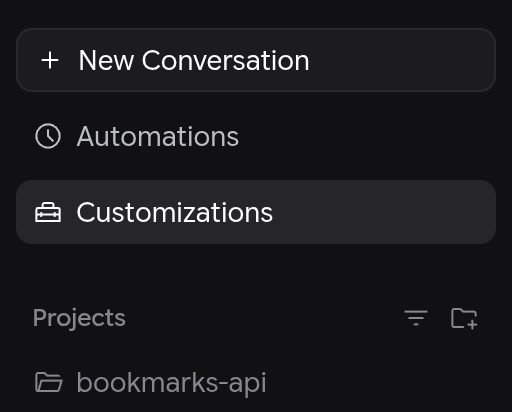
在左侧边栏中,点击 Customizations 标签页(位于 Automations 下方):
-
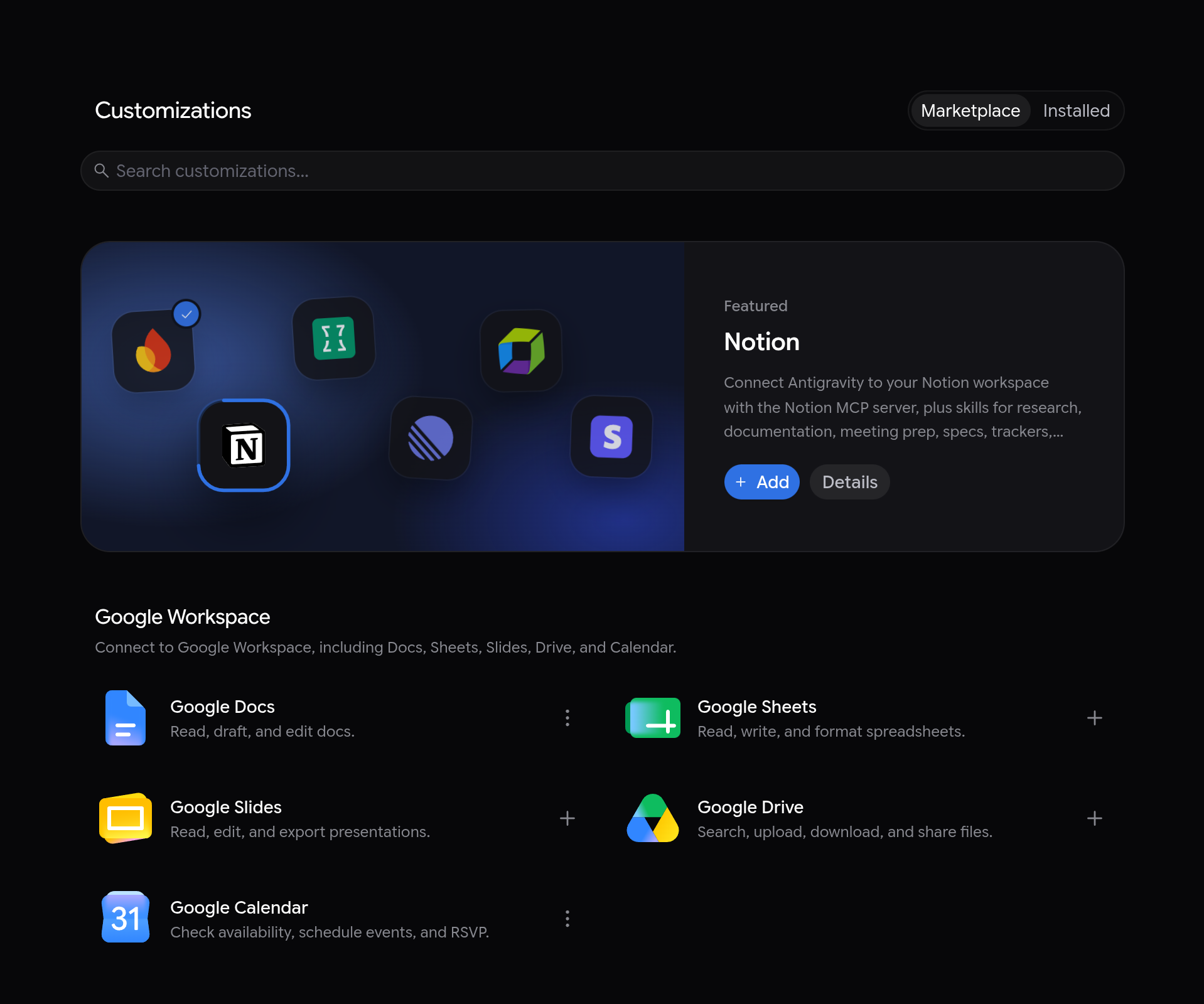
单击 市场 选项卡查看可用插件:
-
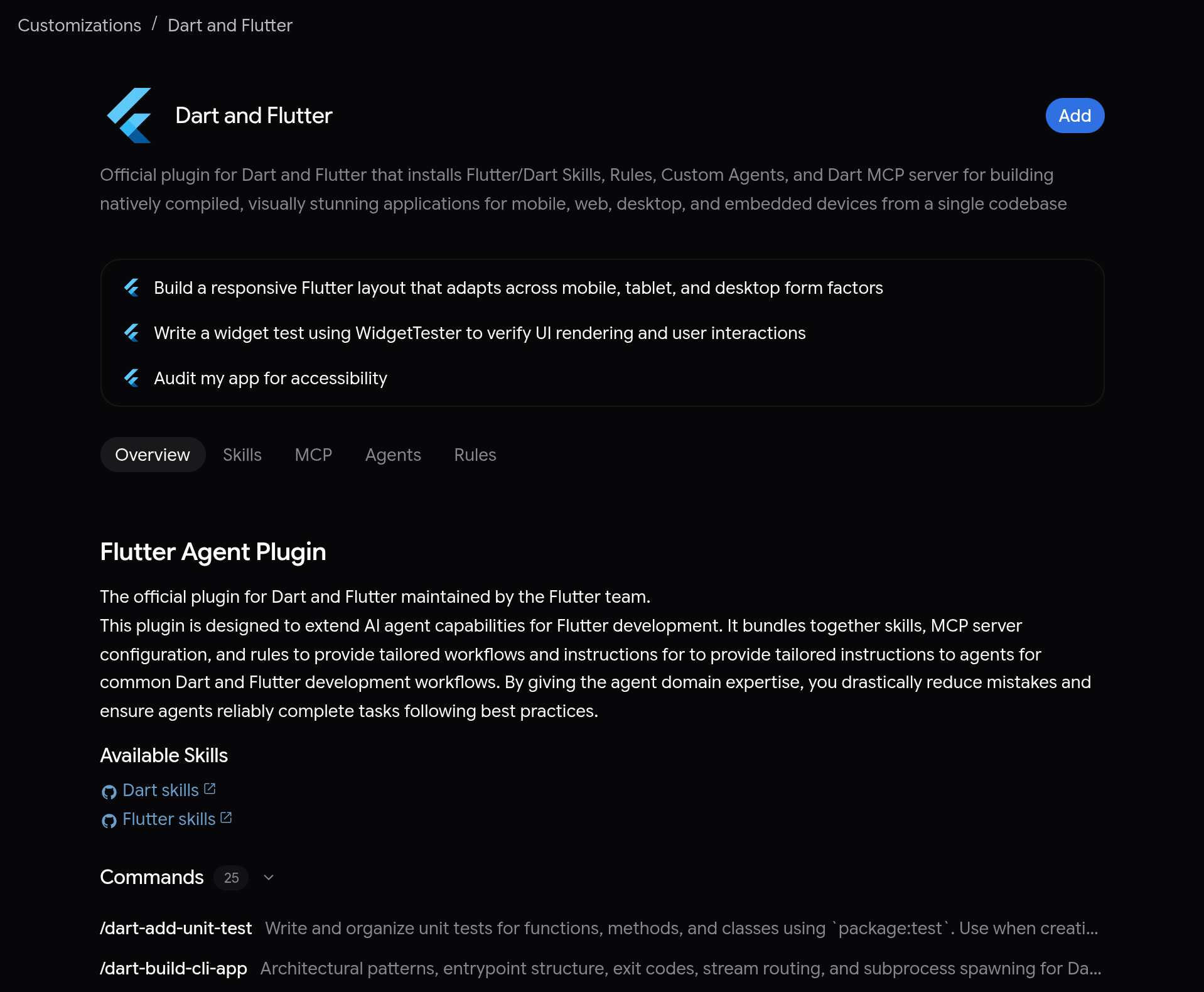
单击任何插件卡以检查其详细信息和捆绑功能:
-
点击 Add 安装插件。您也可以在 Marketplace 列表中点击插件旁边的 + 直接安装,无需打开其详情。
配置插件凭据(API 密钥与 OAuth)
部分插件会连接外部服务,需要先完成身份验证才能运行其 MCP 工具:
- API 令牌与配置变量:如果插件需要 API 密钥、令牌或工作区 URL,在 Customizations > Installed 中启用该插件时会打开设置对话框,提示输入各个变量(并提供直接链接用于生成或查询令牌)。
- OAuth 登录:如果插件使用 OAuth 2.0,当插件的 MCP 服务器连接时,Antigravity 会打开浏览器以完成登录。
管理已安装的插件
要检查、切换或卸载现有插件:
-
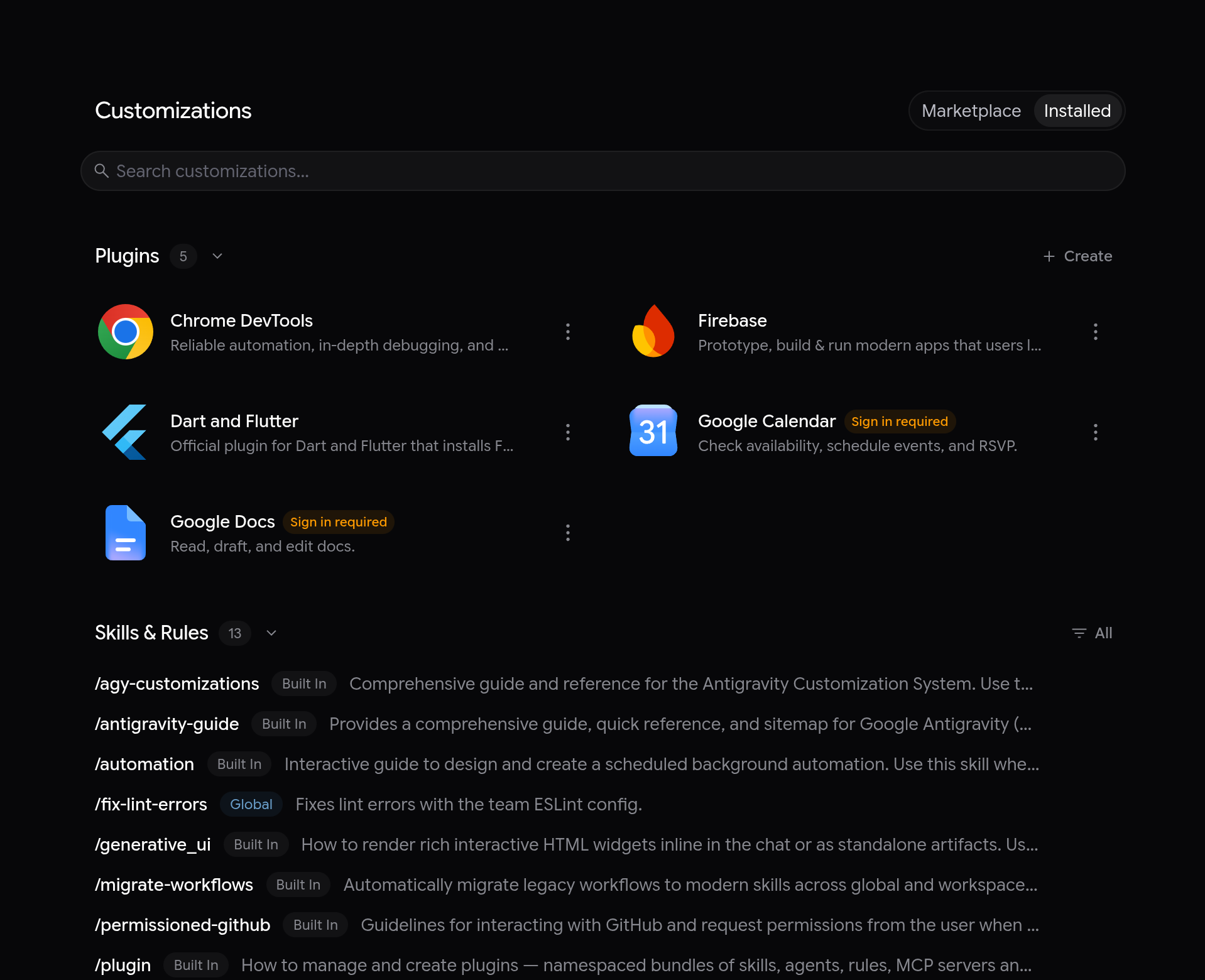
在 定制 面板中,单击 已安装 选项卡:
-
点击任意已安装插件旁边的 ⋮ 菜单(或打开插件卡片),即可启用、停用或配置该插件。
-
从 ⋮ 菜单(或在插件详情页面上)选择 Uninstall 即可移除插件。
您在 Antigravity App 中安装的任何插件都会自动同步并显示在 Antigravity CLI 的 已安装 选项卡中。
使用深层链接打开插件
Antigravity App 支持 antigravity:// 插件市场链接,登录后只需单击即可打开目录或特定插件的详情页:
- 插件市场首页:
antigravity://customizations/marketplaces - Google 插件:
antigravity://plugin/<plugin-name>(或antigravity://customizations/marketplaces/antigravity-plugins-official/plugins/<plugin-name>) - 合作伙伴插件:
antigravity://customizations/marketplaces/antigravity-plugins-partners/plugins/<plugin-name>(或antigravity://plugin/<plugin-name>?marketplace=antigravity-plugins-partners)
如果链接中指定的插件 ID 未在目录中找到,Antigravity App 会改为打开插件市场浏览标签页。如果您发布插件并希望在文档或 README 中嵌入在 Antigravity 中打开链接,请参阅分享插件的深层链接。
Antigravity CLI
在 CLI 中打开插件管理器
在 Antigravity CLI 中,使用 /plugin 斜杠命令(或其别名 /plugins)打开交互式插件管理器:
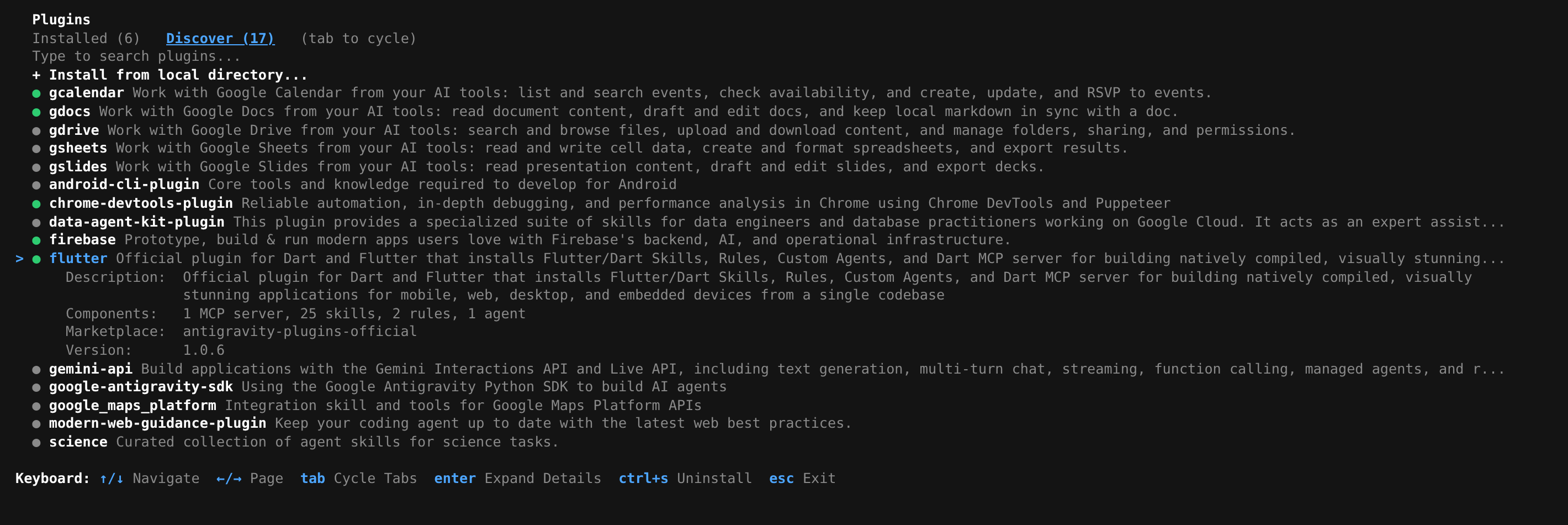
/plugin交互式 CLI 插件管理器 — 按 Tab(或单击选项卡)在“已安装”和“发现”之间切换,按 ↑/↓ 导航,按 Enter 展开详细信息,按空格键切换启用/禁用,按 Ctrl+S 安装或卸载。
按“Tab”软键可在“已安装”选项卡和“发现”选项卡之间切换。
“发现”标签页
使用 发现 选项卡浏览 Marketplace 目录并安装新插件:
- 搜索插件:开始输入内容来搜索和过滤特定插件。
- 从本地目录安装:突出显示 从本地目录安装 并按 Enter 为插件安装提供本地文件系统路径。
- View plugin details: Highlight a plugin and press Enter to
expand its details view. The details view displays the following information:
- 描述
- 包含的组件(MCP 服务器、技能、规则、Agent 等)
- 插件市场名称
- 版本
- 安装或卸载:在已卸载的插件上按 Ctrl + S 安装,或在已安装的插件上按 Ctrl + S 卸载。
以下示例展示了展开所选插件详情后的 Discover 标签页:
安装完成后
安装插件后,界面更新如下:
- 发现选项卡:插件名称旁边会出现一个绿点(
●),指示其安装状态。 - 已安装选项卡:插件名称出现在 已安装 选项卡列表中。
“已安装”标签页
使用 已安装 选项卡检查和管理已安装的插件:
- 搜索已安装的插件:开始输入以过滤已安装的插件。
- 启用或禁用:在已安装的插件上按 Space 可在启用和禁用状态之间切换。如果该插件声明了必填的 MCP 凭据(
variables),按 Space 会先打开交互式提示,让你填写这些值后再启用插件。 - View plugin details: Press Enter on an installed plugin to
expand its details view. The details view displays the following information:
- 描述
- 技能(如果适用)
- MCP 服务器(如果适用)
- 规则(如果适用)
- Agent(如果适用)
- 插件市场名称
- 本地安装路径
- 版本
- 卸载:在已安装的插件上按 Ctrl + S 将其卸载。
键盘快捷键
插件管理器中提供以下键盘快捷键:
| 键 | Tab 补全 | 操作 |
|---|---|---|
| Tab 补全 | 两个都 | 在 已安装 选项卡和 发现 选项卡之间切换。 |
| 任意键 | 两个都 | 在活动选项卡中搜索和过滤插件。 |
| Enter | 两个都 | 展开插件详细信息(或在 发现 中选择 从本地目录安装)。 |
| Ctrl + S | 两个都 | 安装已卸载的插件,或卸载已安装的插件。 |
| Space | 已安装 | 启用或禁用已安装的插件。 |
内联 /plugin 命令
除了交互式面板之外,/plugin 还支持直接从提示符中对 install、uninstall、enable、disable 和 list 插件进行行内命令,而无需打开插件管理器 UI:
-
从插件市场目录或本地目录安装:以
<plugin-name>@<marketplace-name>格式指定插件(Google 插件使用antigravity-plugins-official,合作伙伴插件使用antigravity-plugins-partners),或传入本地路径:/plugin install firebase@antigravity-plugins-official /plugin install stripe@antigravity-plugins-partners /plugin install <local-path>例如,运行
/plugin install firebase@antigravity-plugins-official会输出:Successfully installed plugin "firebase" from "antigravity-plugins-official". -
内联管理和列出插件:运行以下命令:
/plugin uninstall <plugin-name>
/plugin enable <plugin-name>
/plugin disable <plugin-name>
/plugin list
在 Shell 中安装 (agy plugin)
在交互式 TUI 会话之外,您可以使用 agy plugin 直接在 Shell 中安装和管理插件:
- Install from the Marketplace: Once signed in to
agy, install Google plugins fromantigravity-plugins-official(or pass a bare<plugin-name>, which defaults toantigravity-plugins-official) and partner plugins fromantigravity-plugins-partners:
运行中 (Running)# Google plugins (bare name defaults to antigravity-plugins-official) agy plugin install firebase agy plugin install firebase@antigravity-plugins-official # Partner plugins agy plugin install stripe@antigravity-plugins-partnersagy plugin install firebaseoutputs:Installed plugin "firebase" from antigravity-plugins-official - Install from a GitHub link: Clone and stage a plugin directly from a
GitHub repository URL:
agy plugin install https://github.com/<owner>/<repo> - Install from a local directory: Stage a local plugin folder into your
profile:
agy plugin install </path/to/local/plugin> - List installed plugins: Run
agy plugin listfor a human-readable summary of installed plugins and their component counts, or pass--jsonto output a JSON array with installation paths and component names:agy plugin list agy plugin list --json - Enable, disable, or uninstall plugins:
agy plugin enable <plugin-name>
agy plugin disable <plugin-name>
agy plugin uninstall <plugin-name>
浏览市场插件
按发布者、栏目或关键字筛选精选的 Google 官方插件(antigravity-plugins-official)和合作伙伴插件(antigravity-plugins-partners)。点击任意卡片上的在 Antigravity 中打开即可在 Antigravity App 中查看详情页(若尚未安装该应用,按钮会提供直接下载链接),或点击复制 CLI 以复制对应的 agy plugin install 命令。

Chrome DevTools
GoogleReliable automation, in-depth debugging, and performance analysis in Chrome using Chrome DevTools and Puppeteer

Dart 与 Flutter
GoogleOfficial plugin for Dart and Flutter that installs Flutter/Dart Skills, Rules, Custom Agents, and Dart MCP server for building natively compiled, visually stunning applications for mobile, web, des…

Firebase
GooglePrototype, build & run modern apps that users love with Firebase's backend, AI, and operational infrastructure.
Gemini API
GoogleBuild applications and shell workflows with the Gemini Interactions API, Decisions API, Live API, Genie 4 interactive worlds, and Gemini API CLI, including text, image, video, speech, and music gen…
Google 文档
GoogleRead, draft, and edit docs.

Science Overview
GoogleAntigravity for science highlights, and an overview of the main science plugins.

Datadog
PartnerUse Datadog directly in Antigravity through a preconfigured Datadog MCP server. Query logs, metrics, traces, dashboards, and more through natural conversation.

Figma
PartnerTurn Figma designs into production code, map components with Code Connect, and create or edit Figma files in Antigravity.

Linear
PartnerThe product development system for teams and agents. Manage issues, projects, and documents across your Linear workspace from Antigravity.
Notion
PartnerConnect Antigravity to your Notion workspace with the Notion MCP server, plus skills for research, documentation, meeting prep, specs, trackers, and project updates.

Stripe
PartnerAccept payments and grow your business.

Vercel
PartnerBuild and deploy web apps and AI agents on Vercel with skills for Next.js, AI SDK, and cloud services, plus the official Vercel MCP server.

Android CLI
GoogleCore tools and knowledge required to develop for Android.

Chemistry
GoogleRDKit cheminformatics, reaction and property tools, plus ChEMBL and PubChem, to work with molecules, their properties, and bioactivity data.

Data Agent Kit
GoogleThis plugin provides a specialized suite of skills for data engineers and database practitioners working on Google Cloud.

Elephant-Goldfish Model
GoogleDevelop ideas with context and review documents with fresh eyes.
Genomics
GoogleAlphaGenome and major genetics databases to analyze DNA variants, gene regulation, and links between genes and disease.
Gmail
GoogleSearch, read, draft, and send emails in Gmail.
Google Antigravity SDK
GoogleUsing the Google Antigravity Python SDK to build AI agents
Google 日历
GoogleCheck availability, schedule events, and RSVP.

Google Cloud Developer
GoogleGoogle Cloud guidance for coding agents: first-project onboarding, authentication and credential selection, and safety-critical validation for gcloud CLI commands.
Google Developer Knowledge
GoogleSearch and retrieve official documentation across Google Cloud, Gemini, Android, Firebase, Flutter, and Web. Requires Google Cloud credentials (ADC) or an API key.

Google 云端硬盘
GoogleSearch, upload, download, and share files.
Google Health Developer
GoogleSearch and retrieve official Google Health API documentation on developers.google.com/health through the Google Health Developer MCP server.

Google Home Developer
GoogleSearch official Google Home, Matter, and OpenThread documentation and query Cloud-to-cloud user feedback integration diagnostics through the Google Home Developer MCP server.

Google Maps Platform
GoogleIntegration skill and tools for Google Maps Platform APIs

Google 表格
GoogleRead, write, and format spreadsheets.

Google 幻灯片
GoogleRead, edit, and export presentations.

Looker
GoogleConnect to your managed Looker MCP server to explore data, run saved Looks, build dashboards, and validate LookML.

Mass Spectrometry
GoogleCollection of tools for tandem mass spectrometry (MS/MS) analysis, including spectrum preprocessing, GNPS and MoNA spectral library search, SIRIUS formula prediction, and MetFrag and MAGMa fragment…

现代 Web 开发指南
GoogleKeep your coding agent up to date with the latest web best practices.

Robotics
GoogleRobotics skills for any robot: 3D perception, collision-free motion planning, visual servoing, robot bring-up, sim2real, agent iteration, MuJoCo simulation, SimReady 3D asset authoring and physics…
科学文献
GoogleSearch scientific papers, clinical trials, FDA records, and historical texts.
结构生物学
GoogleAlphaFold, 3D visualization tools, and protein databases to explore protein structures, sequences, pathways, and drug interactions.

Adspirer Marketing Analytics
PartnerRead-only marketing analytics: report spend, conversions, CPA and ROAS across ad platforms, GA4 and Search Console. It never changes your accounts.

Any.do
PartnerManage Any.do personal tasks, workspace boards and sections, subtasks, reminders, and connected calendar events from your agent.

Arize AX
PartnerQuery Arize AX projects, traces, datasets, and experiments from Antigravity, with skills for tracing, evals, and prompt optimization.

Atlassian Teamwork Graph CLI
PartnerTeamwork Graph CLI is Atlassian's agent-first interface to your entire work context: Jira issues, Confluence pages, Bitbucket PRs, along with your connected third-party data sources.

Auth0
PartnerAdd Auth0 authentication to any app: login, MFA, SSO, Organizations, RBAC, custom domains, and branding. Debug auth errors and migrate from other providers.

Base44
PartnerBuild and deploy Base44 full-stack apps: CLI project management, JavaScript/TypeScript SDK development, and production troubleshooting skills.

Better Stack
PartnerInvestigate incidents, check who's on call, and query logs, metrics, traces, errors and RUM in Better Stack. Build dashboards and manage uptime monitors.

Bigin
PartnerManage your Bigin CRM from Antigravity: review pipelines, find contacts and deals, log calls, plan follow-ups, and email customers.

Browserbase
PartnerGive your agent a real browser: navigate, click, type, screenshot, and extract data from any site, locally or on Browserbase cloud browsers.

Canva
PartnerCreate, edit, review, resize, and brand-check Canva designs with the Canva MCP server.

Clerk
PartnerAdd authentication and user management with Clerk. Skills for setup, frameworks, organizations, billing, webhooks, and testing, plus the Clerk MCP server.

ClickUp
PartnerConnect Antigravity to your ClickUp workspace — manage tasks, track time, and collaborate with your team without switching context.

Cloudflare
PartnerBuild, deploy and manage apps on Cloudflare Workers, storage and AI, with platform skills and the Cloudflare API through one MCP server.
Cobrief
PartnerSearch European procurement data and manage your tender pipeline.

CodeRabbit
PartnerCodeRabbit is the governance and control layer for agentic software development helping developers trust AI written code.

Context7
PartnerUp-to-date documentation lookup. Pull version-specific documentation and code examples directly from source repositories into your coding agent's context.

CrowdStrike Falcon
PartnerUse the official CrowdStrike-hosted MCP server to work across Falcon: detections, cases, threat intel, SIEM, hosts, vulnerabilities, cloud, and more.

Databricks
PartnerDatabricks skills for the CLI, Apps, Lakebase, Model Serving, Lakeflow Jobs, Spark Declarative Pipelines, Declarative Automation Bundles (DABs), and classic-to-serverless migration.

Descrybe Legal Engine
PartnerResearch U.S. case law, statutes, regulations, and court rules. Find authorities, check quotations against opinions, and see how later courts cite a case.

Docusign
PartnerBuild, test, and debug Docusign integrations with developer skills for authentication, template-based signing, envelope status, and troubleshooting.

Dropbox
PartnerConnect Antigravity to Dropbox to search, inspect, summarize, share, collect uploads, organize folders, and clean up files with confirmation for write actions.

Dynatrace
PartnerInvestigate production issues with real Dynatrace data: problems and root causes, logs, metrics, traces, and vulnerabilities, via skills and the MCP server.

Endor Labs Agent Kit
PartnerPackaged workflows for SCA remediation, AI SAST triage, CI/CD posture, malware response, findings review, Endor Labs setup, and more.

Exabeam Agentic SOC
PartnerTriage Exabeam New-Scale alerts and cases end to end: gather the evidence, map MITRE, reach a verdict, and record it behind an approval step.

Grafana Cloud
PartnerQuery Grafana Cloud metrics, logs, traces and profiles, manage dashboards, alerts and incidents, and ask Grafana Assistant through the hosted MCP server.

Granola
PartnerThe AI notepad for meetings. Connect to your meeting history and use your conversation context to get things done.

Harness
PartnerBuild and debug pipelines, manage deployments, investigate security findings, and operate Harness with connected tools and reusable workflow skills.

incident.io
PartnerRespond to and investigate incidents, manage on-call schedules and escalations, and write runbooks and skills. Bundles the official incident.io MCP server.

Intercom
PartnerSearch Intercom conversations, contacts, and companies, spot support trends, and install the Intercom Messenger with secure identity verification.

invideo
PartnerConnect your agent to invideo's AI-native video editor. It trims, grades and mixes on a real timeline while you watch every change land.

Keenable
PartnerSearch the web and read any page as clean markdown with Keenable, a search engine built for AI agents. Keyless: no signup or API key needed.

Keenable SELECT
PartnerAsk a question of the live web and get a table back. Keenable SELECT runs many searches, reads the pages and extracts the fields you need in one call. Sign in with a Keenable account.

Kling AI
PartnerCreate and edit images with Kling Image 4.0, generate Kling 4.0 and Flash videos with supported HDR settings, reuse Elements, and track tasks.

Leapwork Play
PartnerCreate, run and debug Leapwork Play tests and runlists, build agents, and hand work to Play's AI workflows, right from Antigravity.

Levels.fyi
PartnerSalaries, jobs & career advice. Levels.fyi is your career companion to ensure you get paid fairly and find jobs you'll love.

Meshy
PartnerGenerate 3D models from text or images with Meshy, then texture them and download game-ready GLB, FBX, OBJ and USDZ files, using your Meshy credits.

Midpage Legal Research
PartnerResearch US case law, statutes, and regulations, plus live dockets from federal and state courts. A Midpage account is required.

Mobbin
PartnerGive your AI agent 600,000+ real app screens, and the skills to use them.

monday.com
PartnerPlan and track work in monday.com from Antigravity: create, update and assign items, write docs, and build forms that turn requests into items.

MongoDB Atlas (Managed MCP)
PartnerOfficial Antigravity plugin for MongoDB Atlas (hosted MCP Server + Skills).

mumo
PartnerBring Claude, GPT, Muse, Kimi & more into Antigravity. Run a multi-model panel with cross-model reactions, or ask one model for a second opinion.

n8n
PartnerBuild, test, and manage n8n workflows and Agents through your instance MCP server. Use official skills for node setup, credentials, and debugging.

Neo4j
PartnerAgent skills for Neo4j graph database — write Cypher queries, design graph models, use drivers, run imports, build GraphRAG pipelines, run GDS algorithms, and manage Aura instances.

Netlify
PartnerBuild and deploy on Netlify: functions, edge functions, blobs, database, identity, forms, image CDN, caching, and AI Gateway, plus the Netlify MCP server.

Orca Security
PartnerInvestigate cloud risk from your IDE: query Orca alerts, assets, attack paths, CVEs and compliance posture, and triage findings with Orca's MCP server.

PandaDoc
PartnerCreate and send proposals, quotes, and contracts for e-signature. Track signing progress and identify documents that need follow-up.

Parallel
PartnerSearch the live web and fetch page content with Parallel's hosted MCP server. Free access with no Parallel account, API key, or Parallel CLI required.

Passim AI
PartnerU.S. immigration law research: published and unpublished BIA/AAO and federal cases, INA/CFR, USCIS policy, citator validity checks, and visa bulletins.

PingOne
PartnerAgent plugin for PingOne multi-tenant. Includes skills and a remote MCP server that lets AI agents configure and monitor your PingOne environments.

Postman
PartnerEquip Antigravity with specialized Postman skills for the complete API lifecycle. Discover, design, test, document, mock, monitor, and improve APIs through agent-friendly, filesystem-first workflows.

Qodo
PartnerSet up Qodo, explore code and repository history, review local changes, and resolve pull-request findings directly from Antigravity.

Railway
PartnerDeploy, configure, monitor, and troubleshoot apps, databases, and infrastructure on Railway from Antigravity with Railway's agent skill and hosted MCP server.

Scandit SDK
PartnerSkills for integrating the Scandit Data Capture SDK: product selection, docs and implementation guides for barcode scanning, ID capture and smart label capture.

Scriptivox
PartnerTranscribe meetings, interviews, podcasts and videos in 119 languages, then write minutes, show notes and subtitles from the transcripts.

Semrush
PartnerSEO workflows on live Semrush data: keyword research, site audits, backlinks, competitor, traffic and market analytics, PPC, and AI brand visibility.

SentinelOne Purple AI
PartnerQuery your SentinelOne Singularity Console from Antigravity through a self-hosted, read-only Purple AI MCP server. Requires an active console deployment, your console URL, and an API token.

Sentry
PartnerSet up Sentry monitoring, investigate production errors, and configure alerts and releases with expert skills and live context from your Sentry projects.
SonarQube
PartnerSonarQube is the AI code quality and security verification platform used by millions of developers to catch bugs, vulnerabilities, and leaked secrets.

Spacefast
PartnerTurn an idea into a website, dashboard, report, or small web tool you can share. Build it in chat or bring your own work, and publish it with Spacefast.

Supabase
PartnerOfficial Supabase plugin for Antigravity with Supabase skills and MCP access for project management, database work, auth, storage, and Postgres best practices.

Superpowers
PartnerMake your coding agent a better engineer

Tavily
PartnerWeb search, content extraction, website crawling, URL discovery, and deep research for Antigravity via Tavily's hosted MCP server and skills.

TestMu AI
PartnerRun, debug and triage tests on the TestMu AI cloud, plus Kane CLI for browser and mobile test automation and Rook CLI for testing AI agents.

Trello
PartnerOfficial Trello plugin with the Trello MCP server and a skill for boards, lists, cards, checklists, Inbox, and Planner.

Unity
PartnerUnity's official plugin for Antigravity, with curated skills for game development, monetization, and performance optimization.

VirusTotal
PartnerInvestigate files, URLs, domains and IP addresses with VirusTotal threat intelligence, analysis and submission recovery.

Why Won't AI
PartnerSee what GPTBot, ClaudeBot, PerplexityBot and other AI crawlers get from a website. Skills and a remote MCP server for robots.txt checks, AI visibility scans and agent directory listings.

Wispr Flow
PartnerSearch and read your Wispr Flow meeting notes, transcripts, scratchpad notes, and calendar events. Read-only access to your own account.

Wix
PartnerBuild Wix apps and headless sites, and manage Wix stores, bookings, CMS and more, with Wix CLI skills and the official Wix MCP server.

WordPress
PartnerBuild, publish, and manage WordPress.com and Jetpack-connected sites. Draft posts, edit blocks, check traffic stats, moderate comments, and manage plugins.

Zapier
PartnerAutomate workflows across 10,000+ apps. Run one-off actions or build automations for YouTube, Instagram, Gmail, Facebook Pages, LinkedIn, Slack, Pinterest.

Zoho Books
PartnerRun Zoho Books from Antigravity: invoicing, bills, banking, journals, projects, items, taxes, customization and automation.

Zoho CRM
PartnerBuild on Zoho CRM v8: REST API, Deluge functions, ClientScript, widgets, COQL and connections, with live CRM data through your Zoho MCP server.

Zoho Desk
PartnerZoho Desk plugin for Antigravity.

Zoho Projects
PartnerConnect Zoho Projects to Antigravity to turn tasks and issues into working code. Access project context, investigate bugs, and update work items as you develop.
没有插件符合当前筛选条件。请清除搜索内容,或切换回“所有专区”。
使用已安装的插件
安装并启用插件后,其内置的各项能力会自动在你的工作区中生效:
| Component | 如何在工作流中使用 |
|---|---|
| 初始提示词 | 在 Antigravity App(Customizations > Installed)中,打开插件的详情视图并点击任意建议提示词标签,即可立即启动引导式任务。 |
| 技能 | 使用自然语言描述任务(Antigravity 会采用渐进式披露机制按需加载相关的插件 skill),或者在对话中输入 /<skill-name> 显式调用某个 skill。 |
| MCP 服务器 | 让 Agent 查询或操作已连接的服务(例如 Jira、Figma、Datadog、Stripe 或 Firebase)。启用插件期间,内置的 MCP 工具(命名空间格式为 <plugin-name>_<server-name>)会自动可用。 |
| 自定义 Agent 与子 Agent | 主 Agent 会自动将专项任务(例如安全审查或无障碍审计)委派给内置的子 Agent。你也可以通过 App 中的 Agent 选择器、CLI 中的 /agents 命令,或在终端中运行 agy --agent <agent-name>,直接将插件的自定义 Agent 作为主会话 Agent 运行(运行 agy agents 可列出所有可用的 Agent)。 |
| 规则与 Hook | 启用插件期间会在后台自动运行,无需手动调用即可强制执行编码规范、SDK 标准以及工具执行前后的策略检查。 |
下一步
探索相关文档和指南:
- 插件:了解如何在 Antigravity App、Antigravity CLI 和 Antigravity IDE 中配置、使用和管理已安装的插件。
- 构建插件:编写
plugin.json清单,打包 skill、MCP 服务器、自定义 Agent、规则和钩子,并使用agy plugin validate在本地验证插件。 - 将插件上架到插件市场:填写此意向表单,将通过验证的插件提交至 Antigravity Marketplace。
- 与 Google 一起构建 (Build with Google):探索适用于 Firebase、Android、Flutter、Chrome DevTools、BigQuery 等的精选 Google 插件。
- CLI 参考:查看 Antigravity CLI中的所有斜杠命令和键盘快捷键。