MCP Apps let a Model Context Protocol (MCP) tool ship an interactive HTML interface alongside plain-text model output. Antigravity implements the open MCP Apps specification (io.modelcontextprotocol/ui) and adds Antigravity-specific entrypoints (com.google.antigravity/ui) for side panel, full-page, and custom file viewer surfaces.
For the full protocol specification, iframe bridge lifecycle, theming tokens, and SDK reference, see the MCP Apps overview and the @modelcontextprotocol/ext-apps API reference.
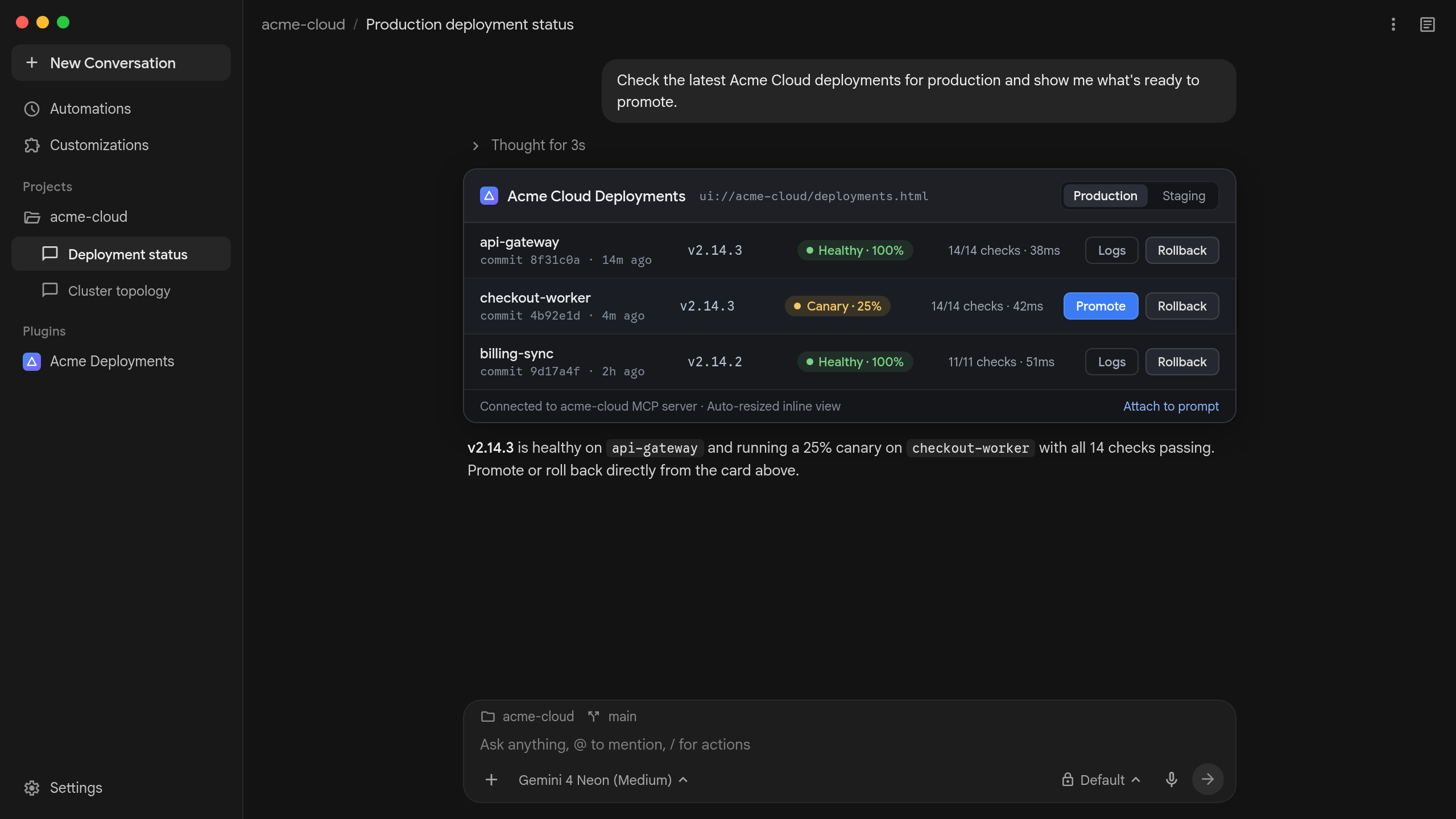
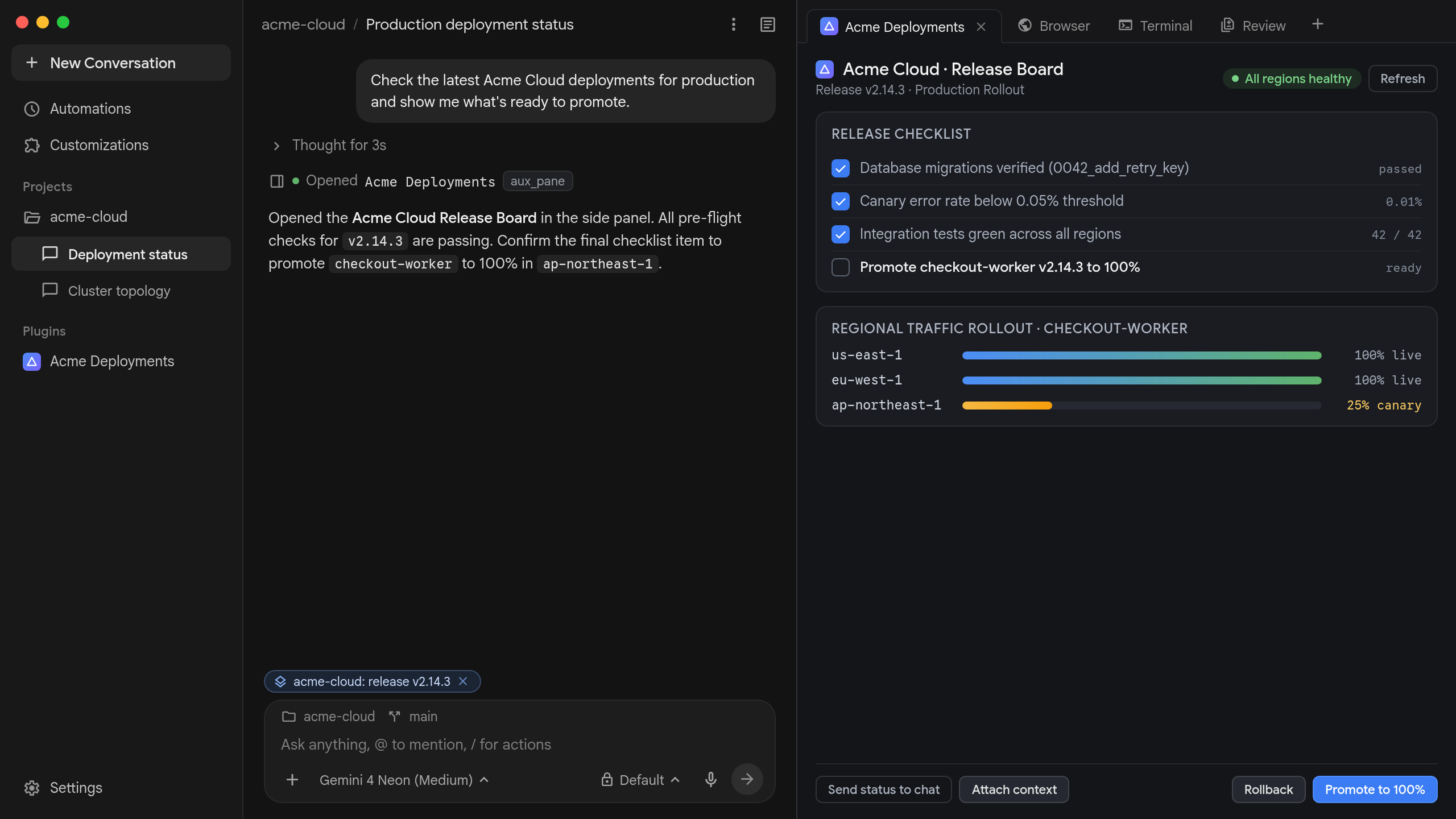
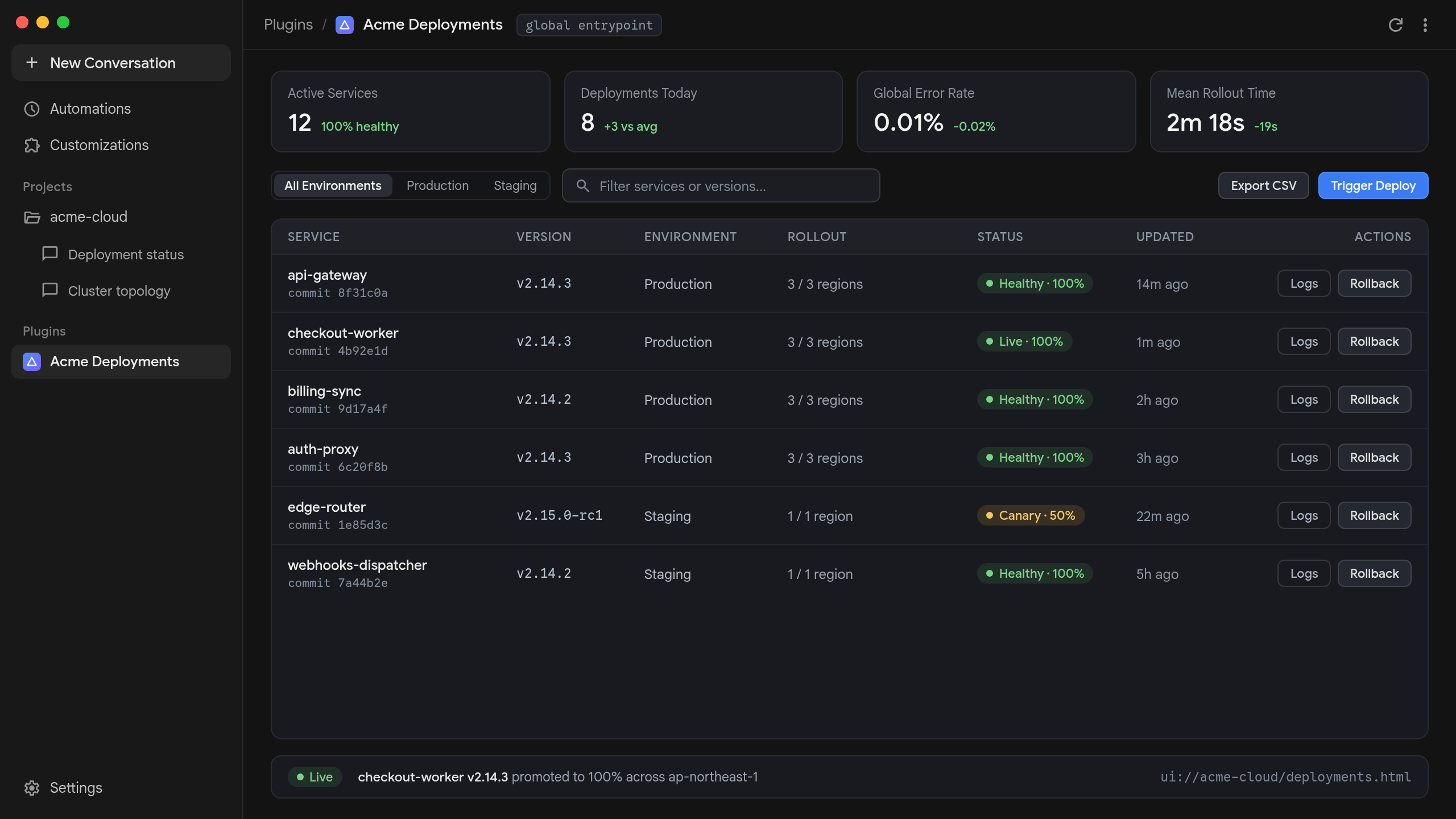
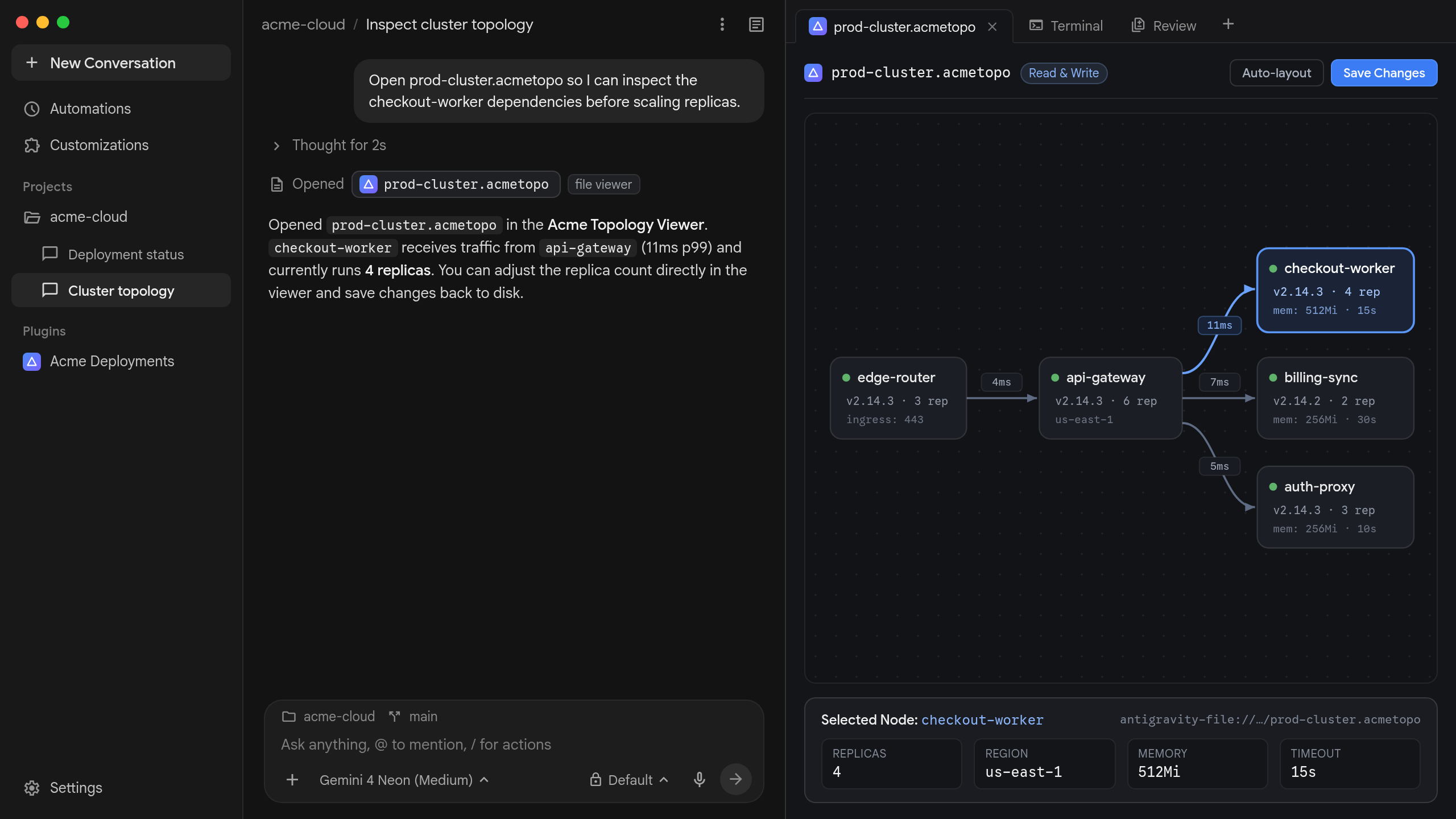
MCP Apps in the Antigravity App: inspect an inline deployment card in chat, open the side panel release board to promote a canary rollout, switch to the full-page view from Plugins in the sidebar, and edit a custom file type in a file viewer tab.
MCP Apps 的展示位置
每个 MCP App 都来自你安装或构建的插件或 MCP 服务器。每个工具都通过 _meta 控制其视图的渲染位置:
对话中内嵌
侧边栏面板
整页视图
文件查看器
| 交互界面 | 声明方式 | 打开方式与行为表现 |
|---|---|---|
| 对话内行内展示 | _meta.ui.resourceUri | 直接在对话流中替换折叠的 MCP 工具步骤卡片。高度自动调整,最高可达 800 px(回退值为 150 px)。配置了 aux_pane 或 global 入口点的工具不会在行内渲染。 |
侧边栏面板aux_pane | aux_pane entrypoint | 当 Agent 完成工具调用时,或者通过在侧边窗格中打开、概览 > 插件、侧边栏的 + 菜单或更多操作 (⋯) > 插件在对话旁打开。每个 (server, tool) 对应一个标签页。手动启动会传入 {};Agent 重复调用会就地更新已打开的标签页。 |
全屏页面global | global entrypoint | 通过左侧边栏中的插件在任何对话之外以全宽模式打开。手动启动会传入 {}。仅限对话使用的功能(message、updateModelContext)将被省略。 |
文件查看器file | file entrypoint | 针对匹配所声明扩展名的文件,替换内置查看器。使用插件的 logo 作为标签页图标,无论 visibility 如何设置都对模型保持隐藏,并接收 {"file": {"name", "resourceUri"}}。 |
Antigravity CLIagy | mcp_config.json | 通过 <plugin>_<server> 连接到 /mcp,不渲染 iframe。忽略 _meta.ui.visibility(向模型公开所有列出的工具,包括 visibility: ["app"] 辅助工具和 file 入口点工具),并直接读取纯文本 content。 |
对于由实时 MCP 服务器驱动的可复用工具或插件 UI、侧边栏视图或自定义文件查看器,请使用 MCP Apps。对于在单次对话中即时生成的一次性图表、图形或原型,请使用 /generative_ui。
快速入门
Antigravity App 包含内置的 /mcp-app-development 命令。你可以让 Agent 直接在工作区中搭建一个初始 MCP App 插件脚手架:
/mcp-app-development Build an MCP App plugin for Antigravity that tracks release checklist items inline in chat and in a side panel board using @modelcontextprotocol/ext-apps.如需手动构建 MCP App,请按以下步骤操作:
- Follow the MCP Apps specification and
@modelcontextprotocol/ext-appsAPI reference to bundle a single-fileui://HTML resource (text/html;profile=mcp-app) and link it from_meta.ui.resourceUri. - 将服务器打包到插件中,并在插件根目录下放置
mcp_config.json(本地${PLUGIN_ROOT}服务器使用${PLUGIN_DATA}和stdio,远程 Streamable HTTP 服务器使用serverUrl)。 - 使用
agy plugin validate <path> --strict和agy plugin install <path>在本地验证并安装插件。
Antigravity 扩展
在 MCP initialize 阶段,Antigravity App 会在声明 com.google.antigravity/ui 的同时声明 {"entrypoints": ["aux_pane", "global", "file"]} (io.modelcontextprotocol/ui)。
Entrypoints
在同时声明了有效 _meta["com.google.antigravity/ui"].entrypoints ui:// 的工具上添加 resourceUri,以便在行内对话流之外打开视图。请将 file 入口点保留在单独的工具上:任何带有 file 入口点的工具都会无条件对模型隐藏,并且会接收 {"file": {"name", "resourceUri"}} 而不是 {}:
// Tool 1: model-callable side panel + full-page view
{
  "_meta": {
    "ui": { "resourceUri": "ui://acme-cloud/deployments.html" },
    "com.google.antigravity/ui": {
      "entrypoints": [
        { "type": "aux_pane", "title": "Acme Deployments" },
        { "type": "global", "title": "Acme Deployments" }
      ]
    }
  }
}

// Tool 2: separate host-invoked custom file viewer
{
  "_meta": {
    "ui": { "resourceUri": "ui://acme-cloud/topology-viewer.html" },
    "com.google.antigravity/ui": {
      "entrypoints": [
        { "type": "file", "title": "Acme Topology Viewer", "extensions": [".acmetopo", ".jsonc"] }
      ]
    }
  }
}| 类型 | 附加字段 | 宿主行为 |
|---|---|---|
aux_pane | title (optional string) | 由 Agent 调用时会自动在当前对话旁打开;通过菜单手动启动会传入 {}。不会在行内渲染。每个 (server, tool) 组合对应一个标签页。 |
global | title (optional string) | 通过左侧边栏中的插件传入 {} 并以全宽模式打开。不会在行内渲染。 |
file | title (optional string)extensions (required string[]) | 无论 visibility 如何设置,始终对模型隐藏。文件扩展名会统一规范化为带前导点号的小写形式。首个声明某扩展名的已启用服务器优先生效。 |
自定义文件查看器与编辑器
当用户打开匹配 file 入口点扩展名的文件时,Antigravity 会使用每个视图独立的不透明 URI ({"file": {"name": "bracket.stl", "resourceUri": "antigravity-file://<uuid>/bracket.stl"}}) 调用该工具,而不会暴露原始文件系统路径:
- 读取:从 iframe 针对该确切的
resources/read发送resourceUri请求。Antigravity 会直接响应(无需调用你的 MCP 服务器),并返回 base64 编码的blob(application/octet-stream,最大 10 MiB)。 - 写入(仅限本地文件):在启用保存控件之前,请先检查
hostContext["com.google.antigravity/resources"]?.write。当该属性存在时,可发送包含com.google.antigravity/resources/write(UTF-8) 或{ uri, text }(base64) 的{ uri, blob }请求,大小上限为 10 MiB。
其他宿主操作
- 在侧边栏中打开文件:调用
app.request(),将方法设为com.google.antigravity/toggle-aux-pane,并将参数设为{ "tabType": "fileView", "uri": "file:///path/to/file" }。对于不支持此扩展的宿主,请妥善处理 JSON-RPC-32601错误。 - 发起后台对话:在
_meta: { "com.google.antigravity/message": { "target": "new" } }(ui/message) 中传入app.sendMessage(),即可在同一项目中发起新对话,而不是发送到当前会话中。
Antigravity 宿主限制与注意事项
| Limit | 值 | 备注 |
|---|---|---|
| HTML 与文件大小 | 10 MiB | 适用于 ui:// HTML 文档以及 antigravity-file:// 的读写操作。 |
| 持久化工具结果 | 1 MiB | 存储在轨迹步骤中的 CallToolResult 载荷;请通过仅限应用调用的工具加载较大的数据集。 |
Concurrent tools/call | 每个视图 4 个 | 严格限定于视图所属的 MCP 服务器;关闭视图时,正在执行的调用将会中止。 |
| 隐藏的后台框架 | 5 (LRU) | 隐藏的 aux_pane 和 global 框架会保留挂载在内存中,上限为 5 个框架。 |
| 行内卡片高度 | 150 px 回退值最大 800 px | 如果 150 px 内未收到 size-changed 事件,则回退为 100 ms;更高的视图会在内部滚动。 |
| Teardown | 无通知 | Antigravity 在关闭时不会发送 ui/resource-teardown;请及时持久化保存修改。 |
| 隔离与 CSP | Default-deny | 无持久化浏览器存储的隔离 iframe。仅在资源 _meta.ui.csp 中将纯源(bare origins)加入允许列表,并优先使用 tools/call 而非 connectDomains。 |
迭代开发本地插件
Antigravity 会将插件服务器的命名空间设为 <plugin-name>_<server-key>,并仅在 "command": "node" 时回退到其内置的 Node.js 运行时。由于 ui:// 资源在每次挂载时都会重新获取,因此关闭并重新打开视图即可应用 HTML 修改。编辑本地 stdio 服务器代码后,请依次前往自定义 > 已安装 > 选择插件 > MCP > 更多操作 (⋮) > 重启来重启服务器。
下一步
- MCP Apps overview: Concepts, architecture, and host guides on
modelcontextprotocol.io. - MCP Apps specification: Full
io.modelcontextprotocol/uiprotocol specification. @modelcontextprotocol/ext-appsAPI reference: Client and server SDK documentation.- 模型上下文协议 (MCP):在 Antigravity 中连接并配置本地
stdio和远程 Streamable HTTP MCP 服务器。 - 构建插件:打包
plugin.json、mcp_config.json和 skill,并发布到 Marketplace。 - 侧边栏与概览面板:使用侧边栏标签页和插件菜单。
- 生成式 UI (
/generative_ui):无需 MCP 服务器即可构建一次性交互式 HTML 产物。