Antigravity 使用统一的细粒度权限引擎,对照拒绝 (Deny)、询问 (Ask) 和允许 (Allow) 访问列表来评估敏感的工具操作。如果您在 Gemini Enterprise 中使用 Antigravity,请参阅 Gemini Enterprise 中的 Antigravity。
Antigravity App
更新后的权限设置
Antigravity 使用强大、统一的权限引擎来保护您的环境,同时支持自主工作流程。Agent 执行的每个敏感操作都表示为格式为 action(target) 的 权限资源。
权限通过三个不同的访问列表评估:
- 否定:该动作立即被阻止。
- Ask(询问):Agent 会暂停并提示您明确批准,然后再继续。
- 允许:允许该操作而不提示。
权限预设方案
权限预设 控制 Agent 操作的批准方式。您配置的允许、拒绝和询问规则位于预设之上,并且始终优先:
| 预设 | 终端沙箱 | 终端命令 | 文件访问 | MCP 和网络 |
|---|---|---|---|---|
| 请求审查 | 已禁用 | 总是问 | 仅工作区 | 问 |
| Default (default) | 已启用 | 允许在沙箱中使用;到外面去问 | 工作区+临时目录 | 问 |
| 自动 | 已启用 | Allowed in sandbox; checked automatically outside | 工作区+临时目录 | 问 |
| Turbo | 已禁用 | 允许(无限制) | 完整的文件系统 | 允许 |
The two presets that use the sandbox work as follows:
- Default(“在执行敏感操作前询问。”;默认):终端命令在隔离的终端沙箱内运行,访问权限仅限于您的工作区和临时目录,且无网络访问权限。当命令需要网络连接或主机资源时,Agent 会请求在沙箱外运行该命令——除非已被某条
command(...)允许规则覆盖,否则会弹出提示请求您的批准。 - Auto(“自动决定是否运行命令。”):命令默认同样在终端沙箱内运行。当命令需要在沙箱外运行时,Antigravity 会自动评估该命令,使安全、可逆的命令无需提示即可运行,而存在风险或不可逆的命令仍会请求您的批准。
Refer to Agent settings for more detail on each preset.
更改权限预设
You can set a preset for all projects, override it for a single project, or switch presets from the message box.
For all projects
若要更改所有项目的预设,请打开 Settings > General > Global Permissions > Permission Preset(如果您可以使用远程 Agent,则为 Permissions > This Computer):
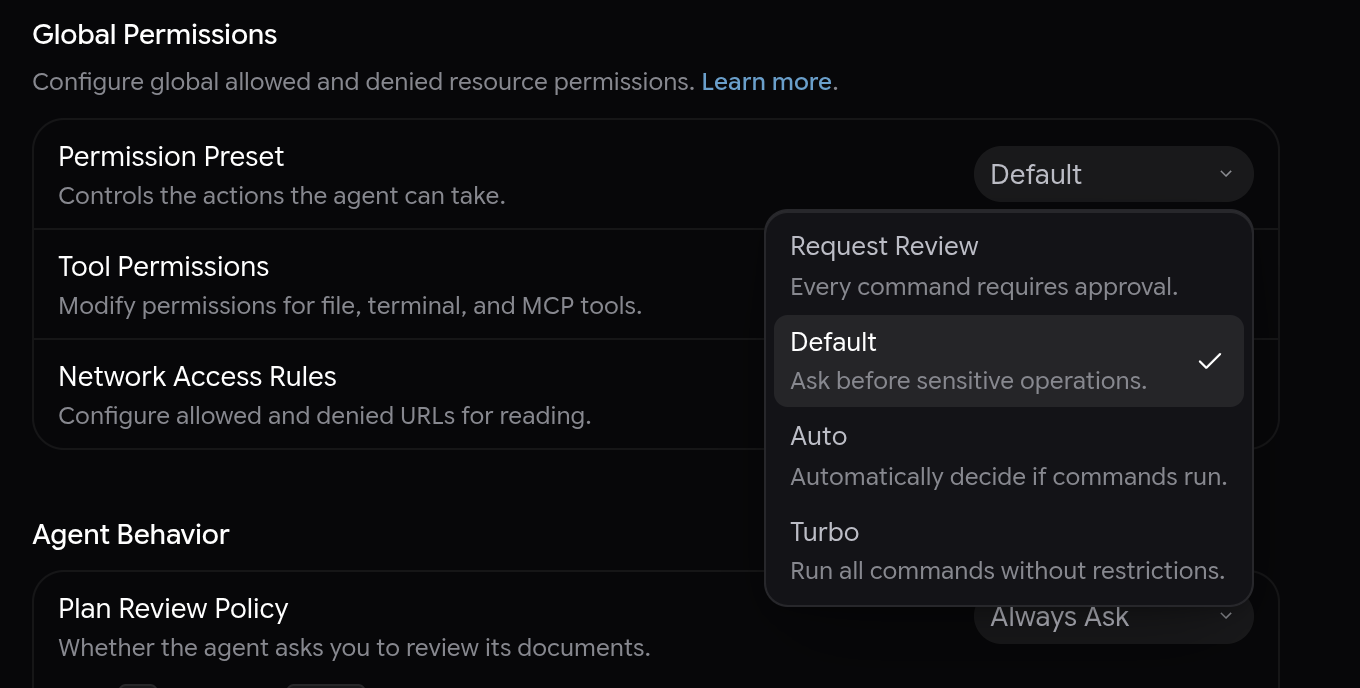
The checkmark marks your current global preset.
For a single project
To override the global preset for a single project, change the project’s preset under Settings > Projects. New projects default to Inherit Global, which follows your global preset.
From the message box
In v2.23.0+, you can also choose a preset from the permissions picker in the message box:
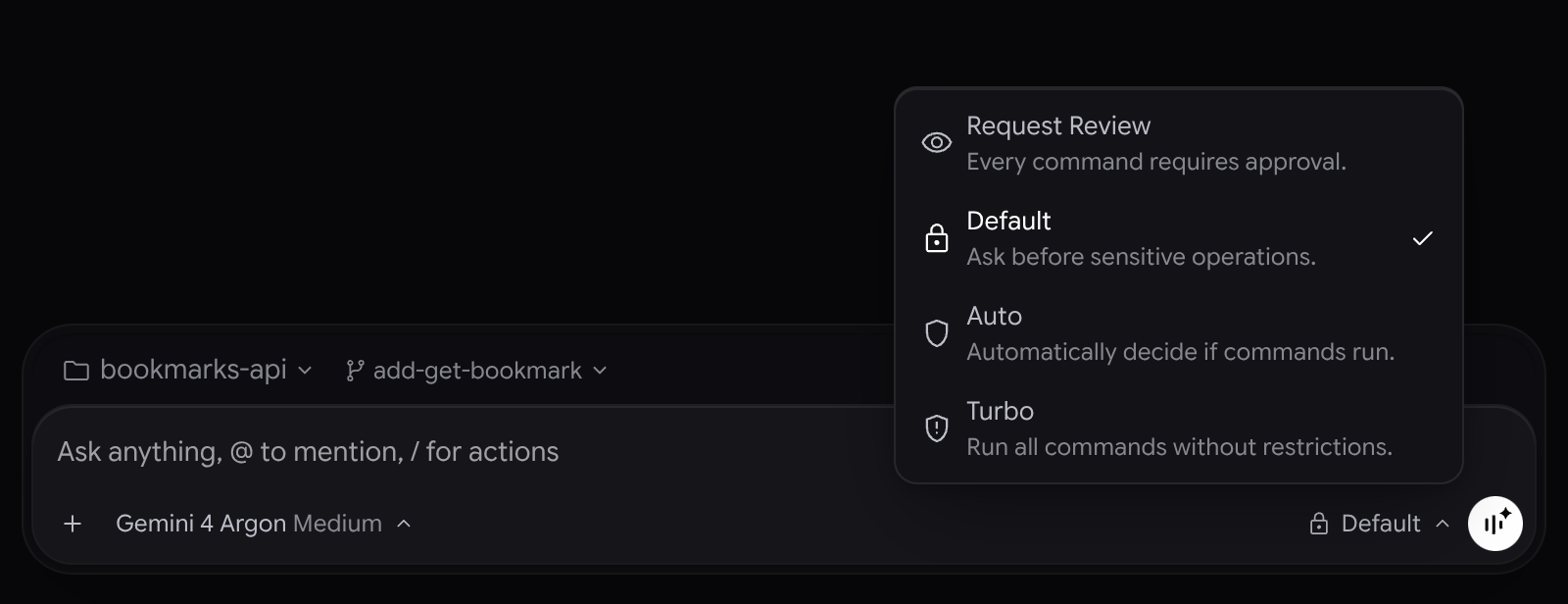
The picker changes your global preset, or the project’s preset if the project overrides it. To remove a project override, choose Use Global Settings.
支持的操作与匹配规则
The following table lists the supported permission actions, their target formats, and their default behavior:
| 操作 | 目标格式 | 默认回退 |
|---|---|---|
read_file | read_file(/path)、read_file(dir) 或 read_file(*) | Ask(询问)(工作区允许) |
write_file | write_file(/path) 或 write_file(*) | Ask(询问)(工作区允许) |
read_url | read_url(domain) 或 read_url(*) | Ask(询问) |
execute_url | execute_url(domain) 或 execute_url(*) | Ask(询问) |
download_url | download_url(domain) or download_url(*) | Ask(询问) |
command | command(prefix)、command(regex:pattern) 或 command(*) | Ask (Allowed in sandbox under the Default and Auto presets) |
mcp | mcp(server/tool)、mcp(server/*) 或 mcp(*) | Ask(询问) |
Each action matches its target as follows:
read_file: Matches absolute paths or paths relative to project workspace roots. Grants recursive read access to all contained files and folders. Usingread_file(*)matches all files on the system.write_file: Same asread_file. Implicitly grantsread_filefor the exact same target path.read_url: Matches hostnames and subdomains (for example,google.comcoversmail.google.com). Ignores URL path segments. Usingread_url(*)matches any domain.execute_url:涵盖浏览器子 Agent 打开或重定向到某个网域上的页面。匹配主机名和常规子网域并忽略 URL 路径片段,同时按localhost隔离:port(例如,localhost:3000与localhost:8080相互独立),并要求为敏感的 Google 子网域(如mail.google.com、docs.google.com、drive.google.com和console.cloud.google.com)配置显式规则。read_url授权不包含此权限。download_url:涵盖 Antigravity App 中的内置浏览器 Agent 从某个网域下载文件(在v2.30.0+中可在浏览器操控规则下配置,在v2.31.0+中支持交互式下载提示)。使用与localhost:port相同的网域、execute_url和敏感 Google 子网域匹配规则(data:和blob:下载始终每次询问,且可执行文件或活动标记文件类型会被拦截)。请参阅浏览器使用权限与安全护栏。command: Matches by exact word or token prefix literally by default. To match by regular expression, start the target with theregex:prefix (each whitespace-separated token is evaluated as an anchored regular expression^(?:pattern)$, for example,command(regex:npm run (build.*))). Covers execution both inside and outside the sandbox.mcp: Matches exact MCP tools or all tools on a specified server (applies equally to local and remote MCP servers). Usingmcp(*)matches any tool.
何时需要命令精确匹配
某些 Shell 语法结构可能会在看似无害的前缀背后隐藏任意命令执行——例如命令或进程替换($(...)、反引号、<(...))、算术展开($((...)))、大括号展开({a,b})、非字面量命令名称、网络或文件描述符重定向,以及会执行子命令的开发者工具标志(例如 git -c core.pager=<cmd> 或 tar --to-command)。当 Antigravity 检测到上述任何结构(或无法完整解析该命令)时,会对整行命令行禁用前缀匹配:仅当规则与整行命令逐字符完全匹配(或针对 regex: 规则匹配完整原始命令行)时,命令才会在不提示的情况下运行,否则将回退到 Ask(询问)模式。
标准 shell 组合仍然正常前缀匹配:管道、&&/||/; 链、带引号的文字、纯 $VAR 参数、简单文件重定向和透明包装器(timeout、nohup、nice、 env,其内部命令自行评估)。例如,如果 command(git) 位于允许列表中,则 git status && git log 运行时不会出现提示,而 git log $(whoami) 则会提示批准。
理解跨平台的 read_url 与 execute_url
Antigravity 会在以下三个方面检查 read_url 和 execute_url:
- Web page reading: When the agent fetches web page Markdown for research, it checks your
read_urlgrants. - 浏览器子 Agent:当浏览器子 Agent 打开页面或触发文件下载时,它会检查您针对该网域的
execute_url和download_url授权,而非read_url(并且每次文件上传都需要一次性批准,即使在 Turbo 模式下也是如此)。有关详情,请参阅浏览器使用以及允许列表与拒绝列表。 - 终端沙箱:在
read_url下授予的任何域都会直接编译到沙箱的出站网络白名单中,允许curl或npm等命令连接到授权主机。
跨平台命令与路径匹配
无论您是在 macOS、Linux 还是 Windows 上开发,Antigravity 都能确保您的权限规则始终如一地发挥作用。在 macOS 和 Linux 上,路径使用标准正斜杠 (/)。在 Windows 上,Antigravity 在规则评估之前自动规范化路径,方法是剥离驱动器号(例如 C:)并将所有反斜杠 (\) 转换为正斜杠 (/)。
隐式权限规则
Antigravity applies the following implicit permission rules:
- 写意味着读:在路径上允许
write_file会自动在该路径上授予read_file。 - 拒绝读取意味着拒绝写入:拒绝路径上的
read_file会立即阻止该路径上的write_file。
交互式权限提示
当 Agent 遇到需要批准的操作(Ask(询问)模式)时,编辑器中会出现一张交互式卡。在单击文件、URL或MCP权限的允许之前,您可以直接编辑提示卡中的目标字符串以扩大授予范围(例如将/project/file.txt这样的单个文件请求扩大到父目录/project)。Antigravity 验证您编辑的目标是否安全地覆盖该操作,并在该回合的剩余时间内应用扩展的授权,从而防止重复提示相关操作。 (注意:终端命令不支持范围编辑)。
终端命令与沙箱机制
在 Auto 和 Default 预设下,Agent 会在隔离的终端沙箱内运行终端命令,默认情况下该沙箱仅能访问您的工作区和系统临时目录,且没有网络访问权限。命令可在沙箱内无需手动批准直接运行,而您的权限授权可进一步调整沙箱的访问范围:
read_file下授予的路径动态填充沙箱的只读文件系统白名单。write_file下授予的路径动态填充沙箱的读写文件系统白名单。- 在
read_url下授予的域定义出站网络访问策略。
Because some commands cannot run in the sandbox—for example, those requiring network access—the agent can still choose to run commands outside the sandbox:
- Default(默认):沙箱外的命令会弹出提示请求您的批准,除非已被某条
command规则允许或拒绝。 - Auto:Antigravity 会自动评估需要在沙箱外运行的命令,使安全、可逆的命令无需提示即可继续执行,而存在风险或不可逆的命令仍需获得批准。
默认系统行为与安全护栏
当您的“允许”、“拒绝”或“询问”列表中未明确列出某个操作时,Antigravity 将回退到安全系统默认值:
- 命令:在 Default 预设下,命令在沙箱内运行时无需提示,在沙箱外运行则需要获得批准。在 Auto 预设下,沙箱外的安全命令无需提示即可运行,而敏感或不可逆的命令则会暂停以等待批准。
- 工作区文件:允许在不提示的情况下读取和写入活动项目目录中的文件,而非工作空间文件需要批准。
- 网页浏览默认设为询问(Ask):
read_url和execute_url的操作默认设为询问(Ask)。除非已配置允许规则,否则 Agent 在读取或打开网页之前会暂停并提示您明确批准。 - MCP 工具默认为“询问”:未配置的 MCP 工具调用提示确认批准。
配置示例
以下示例显示了 允许列表 的规则,它定义了在没有提示的情况下运行的操作:
command(git)                             # Standard git commands
command(regex:npm run (build|lint|test)) # Allow safe npm scripts using regex
command(git push)                        # Allow git push, inside or outside the sandbox
read_file(/var/log/app)                  # Read external log paths
write_file(src/)                         # Edit relative src/ folder
read_url(google.com)                     # Fetch Google subdomains
mcp(linter/*)                            # Run linter MCP tools
以下示例显示了 拒绝名单 的规则,它定义了永久阻止的操作:
command(rm -rf)                    # Block destructive deletions
command(regex:curl .*)             # Block unvetted curl downloads
command(sudo)                      # Block sudo privileges
write_file(.git/)                  # Safeguard Git history
write_file(/home/user/.ssh)        # Safeguard SSH keys
以下示例显示了 询问清单 的规则,它定义了暂停以手动确认的操作:
command(*)                         # Prompt all commands
execute_url(aws.amazon.com)        # Prompt before opening AWS pages
mcp(sql/execute_mutation)          # Prompt modifying SQL queries
旧版权限设置
Antigravity 使用强大、统一的权限引擎来保护您的环境,同时支持自主工作流程。Agent 执行的每个敏感操作都表示为格式为 action(target) 的 权限资源。
权限通过三个不同的访问列表评估:
- 否定:该动作立即被阻止。
- Ask(询问):Agent 会暂停并提示您明确批准,然后再继续。
- 允许:允许该操作而不提示。
支持的操作与匹配规则
The following table lists the supported permission actions in the previous permission settings, their target formats, and their default behavior:
| 操作 | 目标格式 | 默认回退 |
|---|---|---|
read_file | read_file(/path)、read_file(dir) 或 read_file(*) | Ask(询问)(工作区允许) |
write_file | write_file(/path) 或 write_file(*) | Ask(询问)(工作区允许) |
read_url | read_url(domain) 或 read_url(*) | Ask(询问) |
execute_url | execute_url(domain) 或 execute_url(*) | Ask(询问) |
download_url | download_url(domain) or download_url(*) | Ask(询问) |
command | command(prefix)、command(regex:pattern) 或 command(*) | Ask(询问) |
unsandboxed | unsandboxed(prefix)、unsandboxed(regex:pattern) 或 unsandboxed(*) | Ask(询问) |
mcp | mcp(server/tool)、mcp(server/*) 或 mcp(*) | Ask(询问) |
Each action matches its target as follows:
read_file: Matches absolute paths or paths relative to project workspace roots. Grants recursive read access to all contained files and folders. Usingread_file(*)matches all files on the system.write_file: Same asread_file. Implicitly grantsread_filefor the exact same target path.read_url: Matches hostnames and subdomains (for example,google.comcoversmail.google.com). Ignores URL path segments. Usingread_url(*)matches any domain.execute_url:涵盖浏览器子 Agent 打开或重定向到某个网域上的页面。匹配主机名和常规子网域并忽略 URL 路径片段,同时按localhost隔离:port(例如,localhost:3000与localhost:8080相互独立),并要求为敏感的 Google 子网域(如mail.google.com、docs.google.com、drive.google.com和console.cloud.google.com)配置显式规则。read_url授权不包含此权限。download_url:涵盖 Antigravity App 中的内置浏览器 Agent 从某个网域下载文件(在v2.30.0+中可在浏览器操控规则下配置,在v2.31.0+中支持交互式下载提示)。使用与localhost:port相同的网域、execute_url和敏感 Google 子网域匹配规则(data:和blob:下载始终每次询问,且可执行文件或活动标记文件类型会被拦截)。请参阅浏览器使用权限与安全护栏。command: Matches by exact word or token prefix literally by default. To match by regular expression, start the target with theregex:prefix (each whitespace-separated token is evaluated as an anchored regular expression^(?:pattern)$, for example,command(regex:npm run (build.*))).unsandboxed: Matches command prefixes word-by-word literally by default (or withregex:). Commands matching this grant execute outside container isolation when terminal sandboxing is enabled.mcp: Matches exact MCP tools or all tools on a specified server (applies equally to local and remote MCP servers). Usingmcp(*)matches any tool.
何时需要命令精确匹配
某些 Shell 语法结构可能会在看似无害的前缀背后隐藏任意命令执行——例如命令或进程替换($(...)、反引号、<(...))、算术展开($((...)))、大括号展开({a,b})、非字面量命令名称、网络或文件描述符重定向,以及会执行子命令的开发者工具标志(例如 git -c core.pager=<cmd> 或 tar --to-command)。在 PowerShell 或命令提示符等 Windows Shell 中,语法无法干净拆分为独立词元的命令也属于此类。当 Antigravity 检测到上述任何结构时,会对整行命令行禁用前缀匹配:仅当规则与整行命令逐字符完全匹配(或针对 regex: 规则匹配完整原始命令行,例如 command(regex:git .*))时,命令才会在不提示的情况下运行,否则将回退到 Ask(询问)模式。
标准 shell 组合仍然正常前缀匹配:管道、&&/||/; 链、带引号的文字、纯 $VAR 参数、简单文件重定向和透明包装器(timeout、nohup、nice、 env,其内部命令自行评估)。例如,如果 command(git) 位于允许列表中,则 git status && git log 运行时不会出现提示,而 git log $(whoami) 则会提示批准。
理解跨平台的 read_url 与 execute_url
Antigravity 会在以下三个方面检查 read_url 和 execute_url:
- Web page reading: When the agent fetches web page Markdown for research, it checks your
read_urlgrants. - 浏览器子 Agent:当浏览器子 Agent 打开页面或触发文件下载时,它会检查您针对该网域的
execute_url和download_url授权,而非read_url(并且每次文件上传都需要一次性批准,即使在 Turbo 模式下也是如此)。有关详情,请参阅浏览器使用以及允许列表与拒绝列表。 - 终端沙箱:在沙箱模式下,
read_url下授予的任何域都会直接编译到容器的出站网络白名单 (AllowedDomains) 中,允许curl或npm等命令连接到授权主机。
跨平台命令与路径匹配
无论您是在 macOS、Linux 还是 Windows 上开发,Antigravity 都能确保您的权限规则始终如一地发挥作用。在 macOS 和 Linux 上,路径使用标准正斜杠 (/)。在 Windows 上,Antigravity 在规则评估之前自动规范化路径,方法是剥离驱动器号(例如 C:)并将所有反斜杠 (\) 转换为正斜杠 (/)。
隐式权限规则
Antigravity applies the following implicit permission rules:
- 写意味着读:在路径上允许
write_file会自动在该路径上授予read_file。 - 拒绝读取意味着拒绝写入:拒绝路径上的
read_file会立即阻止该路径上的write_file。
交互式权限提示
当 Agent 遇到需要批准的操作(Ask(询问)模式)时,编辑器中会出现一张交互式卡。在单击文件、URL或MCP权限的允许之前,您可以直接编辑提示卡中的目标字符串以扩大授予范围(例如将/project/file.txt这样的单个文件请求扩大到父目录/project)。Antigravity 验证您编辑的目标是否安全地覆盖该操作,并在该回合的剩余时间内应用扩展的授权,从而防止重复提示相关操作。 (注意:终端命令不支持范围编辑)。
终端沙箱隔离(预览版)
启用沙箱后,权限授予也适用于命令:
read_file下授予的路径动态填充沙箱的只读文件系统白名单。write_file下授予的路径动态填充沙箱的读写文件系统白名单。- 在
read_url下授予的域定义出站网络访问策略。
默认系统行为与安全护栏
当您的“允许”、“拒绝”或“询问”列表中未明确列出某个操作时,Antigravity 将回退到安全系统默认值:
- 命令默认为询问:未配置的终端命令(
command和unsandboxed)需要手动批准,除非配置为在设置中不提示的情况下运行。 - 工作区文件:允许在不提示的情况下读取和写入活动项目目录中的文件,而非工作空间文件需要批准。
- 网页浏览默认设为询问(Ask):
read_url和execute_url的操作默认设为询问(Ask)。除非已配置允许规则,否则 Agent 在读取或打开网页之前会暂停并提示您明确批准。 - MCP 工具默认为“询问”:未配置的 MCP 工具调用提示确认批准。
配置示例
以下示例显示了 允许列表 的规则,它定义了在没有提示的情况下运行的操作:
command(git)                             # Standard git commands
command(regex:npm run (build|lint|test)) # Allow safe npm scripts using regex
unsandboxed(git push)                    # Allow git push outside sandbox
read_file(/var/log/app)                  # Read external log paths
write_file(src/)                         # Edit relative src/ folder
read_url(google.com)                     # Fetch Google subdomains
mcp(linter/*)                            # Run linter MCP tools
以下示例显示了 拒绝名单 的规则,它定义了永久阻止的操作:
command(rm -rf)                    # Block destructive deletions
command(regex:curl .*)             # Block unvetted curl downloads
command(sudo)                      # Block sudo privileges
write_file(.git/)                  # Safeguard Git history
write_file(/home/user/.ssh)        # Safeguard SSH keys
以下示例显示了 询问清单 的规则,它定义了暂停以手动确认的操作:
command(*)                         # Prompt all commands
execute_url(aws.amazon.com)        # Prompt before opening AWS pages
mcp(sql/execute_mutation)          # Prompt modifying SQL queries
Antigravity CLI
CLI 细粒度权限控制
为了保护您的工作站,同时实现自主工作流程,Antigravity CLI 集成了强大的 细粒度的权限引擎。Agent 执行的每个敏感操作都表示为格式为 action(target) 的 权限资源。
权限通过全局设置 (~/.gemini/antigravity-cli/settings.json) 中配置的三个不同访问列表评估:
deny:该动作立即被阻止。ask:Agent 暂停并提示您明确批准,然后再继续。allow:自动批准该操作而不提示。
支持的 CLI 操作与匹配规则
细粒度权限遵循标准架构模式:
action(target)The supported actions, target format specifications, and default fallbacks are listed in the following table:
| 操作 | 目标格式 | 默认回退 |
|---|---|---|
read_file | read_file(/path)、read_file(dir) 或 read_file(*) | Ask(询问)(工作区自动允许) |
write_file | write_file(/path) 或 write_file(*) | Ask(询问)(工作区自动允许) |
read_url | read_url(domain) 或 read_url(*) | Ask(询问) |
execute_url | execute_url(domain) 或 execute_url(*) | Ask(询问) |
command | command(prefix)、command(regex:pattern) 或 command(*) | Ask(询问) |
unsandboxed | unsandboxed(prefix)、unsandboxed(regex:pattern) 或 unsandboxed(*) | Ask(询问) |
mcp | mcp(server/tool)、mcp(server/*) 或 mcp(*) | Ask(询问) |
The matching algorithm for each action is as follows:
read_file: Matches absolute paths or paths relative to workspace roots. Grants recursive read access to all contained files and folders.read_file(*)matches all files on the system.write_file: Same asread_file. Implicitly grantsread_filefor the exact same target path.read_url: Matches hostnames and subdomains (for example,google.comcoversmail.google.com). Ignores URL path segments.read_url(*)matches any domain.execute_url:涵盖浏览器子 Agent 在某个域名上打开页面的操作(例如访问某个网址或打开新页面)。它会匹配主机名和子域名,并忽略网址路径分段。read_url授权不涵盖此项操作。command: Matches command prefixes word-by-word literally by default. If you want to use a regular expression, add theregex:prefix (for example,command(regex:npm run (build|lint|test))). Covers the command whether it runs inside or outside the terminal sandbox.unsandboxed: Business and enterprise accounts only. Other accounts ignoreunsandboxedrules and show a warning; usecommandinstead. Matches command prefixes word-by-word literally by default (or withregex:). Commands matching this grant execute outside container isolation when terminal sandboxing is enabled.mcp: Matches exact MCP tools or all tools on a specified server (applies to local and remote MCP servers).mcp(*)matches any tool.
CLI 全局通配符语法
在所有受支持的操作类型中,传递全局通配符 *(例如 read_file(*)、command(*) 和 mcp(*))会匹配整个操作命名空间内的所有目标。
CLI 隐式权限规则
Antigravity CLI 应用以下隐式权限规则:
- 写意味着读:在路径上允许
write_file会自动在该路径上授予read_file。 - 拒绝读取意味着拒绝写入:拒绝路径上的
read_file会立即阻止该路径上的write_file。
CLI 跨平台路径规范化
无论您是在 macOS、Linux 还是 Windows 上开发,Antigravity 都能确保您的权限规则始终如一地发挥作用。在 macOS 和 Linux 上,路径使用标准正斜杠 (/)。在 Windows 上,Antigravity 在规则评估之前自动规范化路径,方法是剥离驱动器号(例如 C:)并将所有反斜杠 (\) 转换为正斜杠 (/)。
CLI 跨平台命令匹配
在 PowerShell 或命令提示符等 Windows shell 上,默认情况下无法完全拆分为单独单词的命令需要完全匹配。要在 Windows 上匹配命令及其子命令,请使用 regex: 前缀(例如,command(regex:git .*) 允许任何 git 命令)。
默认 CLI 系统行为与安全护栏
当 allow、deny 或 ask 列表中未明确列出某个操作时,系统将回退到安全系统默认值:
- 工作区自动允许:在标准操作中,系统会自动允许读写当前活动项目目录内的文件(且在
auto和accept-edits模式下无需交互式差异提示即可自动批准)。 - 在
auto模式下命令在沙箱内运行:启用auto模式时,命令会在终端沙箱内运行而无需提示,需要在沙箱外运行的命令会自动接受评估,从而仅在执行存在风险或不可逆的操作时暂停并等待批准。 - 网页浏览默认设为询问(Ask):
read_url和execute_url的操作默认设为询问(Ask)。除非已配置允许规则,否则 Agent 在读取或打开网页之前会暂停并提示您批准。 - 其他未配置的操作默认为询问 (Ask):未配置的
mcp工具、非工作区文件访问以及auto模式之外的命令默认为 Ask(询问),具体取决于当前活动的执行模式和toolPermission设置。
执行模式与终端沙箱
Your fine-grained allow, ask, and deny rules always take precedence (Deny > Ask > Allow). For operations not covered by an explicit rule, Antigravity CLI evaluates your active execution mode (--mode or agentMode in settings.json) and toolPermission policy:
auto模式(--mode=auto或"agentMode": "auto",在v1.5.7+支持该模式的环境中为默认模式):自动批准工作区文件修改,并默认在终端沙箱内运行终端命令。当命令需要在沙箱外运行时,Antigravity CLI 会自动评估该命令,使安全、可逆的命令无需提示即可直接运行,而存在风险或不可逆的命令仍会暂停并等待你的批准。启用时,右下角状态栏会显示auto,提示词占位符会显示Auto mode: edits & safe commands auto-approved (shift+tab to cycle)。accept-editsmode (--mode=accept-edits): Automatically approves workspace file edits and creations while continuing to evaluate shell commands against yourtoolPermissionpolicy and fine-grained rules.default模式(在default中选择/config,或将agentMode设为""):在修改或创建文件前提示交互式差异审阅,并根据你的toolPermission策略(默认为request-review)评估 shell 命令。toolPermissionoverrides:strictandalways-proceed(--dangerously-skip-permissions) take precedence overautomode. Outsideautomode,proceed-in-sandboxruns sandboxed commands without prompting and asks before commands outside the sandbox. Starting inv1.4.4, if the sandbox isn’t available on your machine,proceed-in-sandboxbehaves likerequest-review(refer to Terminal sandbox).
Refer to Choose an execution mode for details on switching modes with Shift + Tab, --mode, or /config.
交互式 CLI 权限提示
当 Agent 遇到需要批准的操作(Ask(询问)模式)时,您的 TUI 中会出现交互式提示卡。
在确认 允许 的文件、URL 或 MCP 权限之前,您可以直接编辑提示卡中的目标字符串来扩大授予范围(例如,将 /project/file.txt 等单个文件请求扩大到父目录 /project)。 CLI 验证您编辑的目标是否安全地覆盖该操作,并在本轮的剩余时间内应用扩展授权,从而防止重复提示相关操作。 (注意:终端命令不支持范围编辑)。
CLI 配置示例
将这些规则添加到您的 ~/.gemini/antigravity-cli/settings.json 文件中:
{
    "permissions": {
        "allow": [
            "command(git)",
            "command(regex:npm run (build|lint|test))",
            "read_file(/var/log/app)",
            "write_file(src/)",
            "read_url(google.com)",
            "mcp(linter/*)"
        ],
        "deny": [
            "command(rm -rf)",
            "command(regex:curl .*)",
            "command(sudo)",
            "write_file(.git/)",
            "write_file(/home/user/.ssh)"
        ],
        "ask": ["command(*)", "execute_url(aws.amazon.com)", "mcp(sql/execute_mutation)"]
    }
}
相关资源
探索相关文档和指南:
- Verification and guardrails: Combine permission rules, sandboxing, unit tests, and live browser checks.
- 权限命令:在 TUI 中交互式管理规则。
- 沙箱定制:强制执行操作系统级别的容器隔离边界。
- 插件和技能:创建您自己的自定义技能和斜杠命令。
- 设置、渲染和键绑定:自定义键盘热键和缓冲区。